

CategoryWord game for TikTok LIVE
Guess the Word Live
- Worth
- $12 one-time
- Words
- 1,708 in 25 categories
- Gifts
- 401, each with an action
- Version
- 1.0.0
One hidden word. First to type it wins.
Guess the Word Live puts a word puzzle on your TikTok LIVE. Letters open one by one, likes and gifts open more, and the first viewer to type the word in chat takes the points while the prize shrinks with every letter.


One round, tile by tile
The same word at four moments of a round, the way chat sees it with the default settings.
-
+5+5+5T+5+5+5+5+5
New word
Blank tiles go up
The category is the hint and one letter starts open. Every blank tile is worth 5 points to the winner, so this word starts at 50.
-
+5+5+5TE+5F+5Y
- Ethe 12-second timer
- F300 likes
- Ya Rose gift
Letters open
The prize starts shrinking
A letter opens every 12 seconds until half the word shows, one for every 300 likes, and more when a gift says so. Three letters later, the word is worth 35.
-
- Jake
buttercupclose guess - Rina
is it butterfly?
not counted - Maya
Butterfly!
counts
Chat guesses
Only the word itself counts
Capitals, spaces, punctuation and emoji are ignored, so Butterfly! counts. A sentence does not, and a wrong guess with the right number of letters shows on screen as a close guess.
- Jake
-
BUTTERFLY
First right answer
Maya takes the 35 points
She also gets 5 points for each round she won in a row before this one. If nobody finds the word in 60 seconds, the missing letters show in red and a new word starts 7 seconds later.
Eight screens your viewers will see
Every screen is set off by something real: a new word, likes, a gift, a right answer, the timer or a quiet chat. Pick one to see what triggers it and which setting controls it.

A word in play
When: A new word starts
The category is the hint and one letter starts open. Each blank tile shows +5, what that letter is still worth, and the prize line under the tiles shows what a right answer pays right now. Wrong guesses with the right number of letters appear under Close guesses.
Default settings
- Round length
- 60 seconds
- Letters shown at the start
- 1 letter
- Open a letter by itself every
- 12 seconds, up to half the word

Likes open a letter
When: The like meter fills up
Every tap on the screen fills the like meter. When it is full, hearts burst out, a letter opens for everyone and the prize drops by 5. Likes and gifts never open the last letter, so somebody always has to type the word.
Default settings
- One letter for every
- 300 likes
- Like meter off
- Set it to 0

Banner for a mid-sized gift
When: A gift worth 10 coins or more arrives
A banner appears at the top with the sender's name, the gift spinning in and what it did, plus three fireworks. Gifts under 10 coins get a smaller notification near the bottom. The plain gift box shows when TikTok's own gift picture is not loaded.
Default settings
- Banner with fireworks from
- 10 coins

Spotlight for a big gift
When: A gift worth 500 coins or more arrives
The screen dims for a full-screen thank-you with the sender's photo, the gift, a firework show and its own sound. Big thank-yous wait their turn, so every gifter gets a full moment even when several gifts land together.
Default settings
- Full-screen spotlight from
- 500 coins
Someone guessed it
When: The first right answer arrives in chat
The tiles turn green and a result card shows the winner, the points, how fast they answered and their streak. Players on the top row slide to their new places.
Default points
- Correct answer
- 10 points
- Each letter still hidden
- 5 points
- Each win in a row
- 5 points

Time's up
When: Nobody finds the word in time
The letters nobody found flip in red so chat sees the answer, and the next word comes up 7 seconds later.
Default settings
- Round length
- 60 seconds
- Answer stays on screen for
- 7 seconds
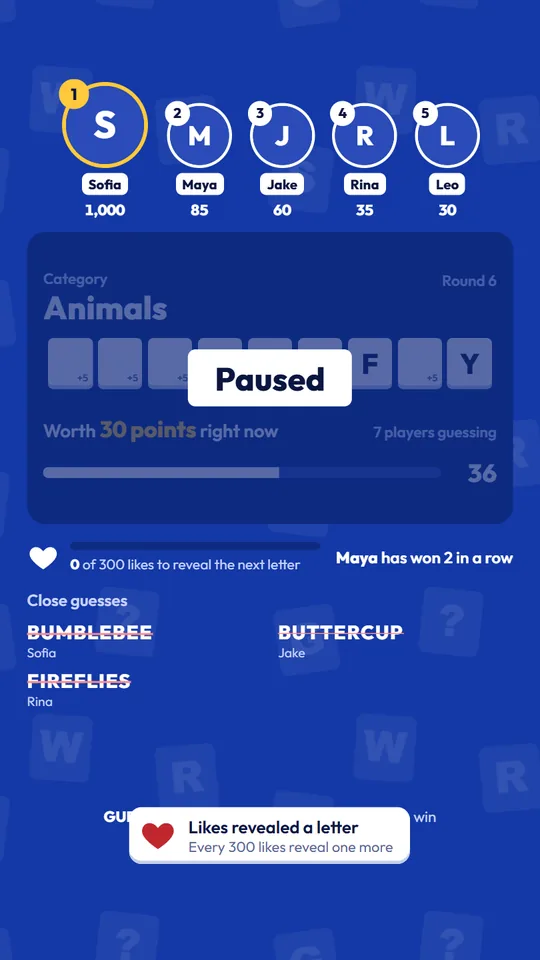
Paused
When: You pause the round from the Admin Panel
The timer freezes, for example while you talk to chat, and the board shows a Paused label until you press Resume.
Other round controls
- During a round
- Reveal a letter, Add 15 seconds, Skip word

Waiting for chat
When: Chat stays quiet for three rounds
With no comment, like or gift for three rounds in a row, the game stops on Type anything in chat to start, with a demo word flipping its letters so the stream never looks frozen. The next comment, like or gift starts a new word.
Default settings
- Wait for chat after
- 3 quiet rounds
- Never wait
- Set it to 0
Fast answers score more
Every blank tile is worth 5 points to the winner. Each letter that opens takes those 5 points off the prize, so the first good guess pays best.
CategoryAnimals
- Right answer
- 10
- 5 letters still hidden, 5 each
- +25
- Third win in a row, 5 x 2
- +10
- Points for the winner
- 45
Who is winning
- The top players row shows the best 3 to 6 scores as circles, largest first, and players slide to their new place when the order changes.
- A streak label appears when someone wins two rounds in a row.
- The Admin Panel leaderboard lists the top 50 players with points, wins and best streak.
- Scores are kept when the server restarts, until you click Reset leaderboard.
What each gift can do
- Reveal letters
- Opens letters for everyone, never the last one
- Add time
- Adds seconds to the round, up to twice the round length
- Bonus points
- Gives points to the sender
- Skip word
- Ends the round and shows the answer
- Do nothing
- Shows the thank-you only
Out of the box, gifts under 5 coins reveal a letter and bigger gifts give the sender points equal to their coin value. Combos multiply the amount, so Rose x10 does ten times as much. You can change the action and amount for each of the 401 gifts.
Run it from the Admin Panel
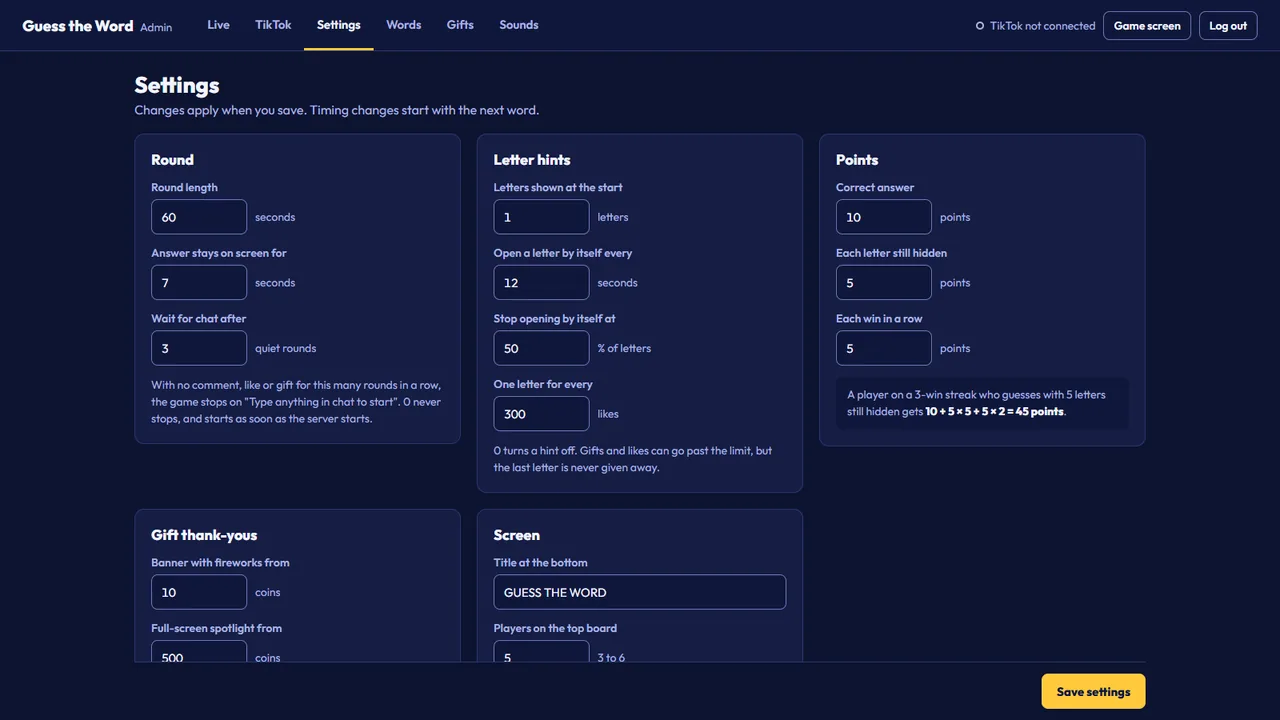
Six tabs: Live, TikTok, Settings, Words, Gifts and Sounds. Changes reach the running game without a restart, and the panel also works on a phone on the same Wi-Fi.




Everything in version 1.0.0
First release, 26 October 2026. To update later, stop the server, keep your tiktok_config.json, words.json and game_state.json, and replace the Source folder.
On screen 7 items
- Top-players row, with players sliding to their new rank.
- The top 8.5% and bottom 14% of the screen stay mostly clear for TikTok's header, chat and gift bar.
- Blank tiles show what each letter is still worth, and the prize counts down as letters open.
- Gift thank-yous in three sizes: notification, top banner with fireworks and full-screen spotlight.
- Like meter that opens a letter every 300 likes, with a burst of hearts.
- Close-guesses list of wrong guesses with the right number of letters.
- Quiet-chat pause with a demo word, so the stream never looks frozen.
Gameplay 4 items
- Viewers type the hidden word in chat to win.
- 1,708 English words in 25 categories, with a word bank editor.
- Points reward fast answers, plus win-streak bonuses, and scores survive restarts.
- An action per gift: reveal letters, add time, bonus points or skip the word.
Running the stream 7 items
- The game screen never receives the answer before the round ends. Only the logged-in Admin Panel does.
- Admin Panel with the live answer, pause, skip, reveal, +15s, a custom word queue, a viewer and gift simulator and a muted preview.
- The Admin Panel works on phones over the same Wi-Fi.
- A new admin password on every start, shown in the server window.
- A colored server window with links, the phone address, the password and a live event log.
- Seven original sound effects, replaceable with your own uploads.
- The game runs on the server, so OBS, previews and refreshes stay in sync.
From download to live in five steps
- Step 1
Install Python 3.10 or newer
On Windows, tick Add Python to PATH in the installer.
- Step 2
Start the game
Open the Source folder and double-click START_GAME.bat. The first start installs the Python packages, which takes about a minute.
- Step 3
Log in to the Admin Panel
Open localhost:5000/admin with the password from the server window. It changes every time the server starts.
- Step 4
Add the game to OBS
Add a Browser Source with the URL http://localhost:5000 at 1080 x 1920, then try a round with Test without going live.
- Step 5
Connect and go live
Go live, type your TikTok username without the @ in the TikTok tab and click Connect.
On macOS and Linux, or by hand, run this in the Source folder:
pip install -r requirements.txt
python app.py
Requirements
- Operating system
- Windows 10 or 11. A start script for macOS and Linux is included.
- Python
- 3.10 or newer
- Streaming app
- OBS Studio, TikTok LIVE Studio, Streamlabs Desktop or another app with a Browser Source
- Browser Source
- http://localhost:5000 at 1080 x 1920. For a horizontal stream, keep that size and scale it down.
- TikTok
- An account that can go LIVE. The game asks for your username, never your password.
- Internet
- Needed for the TikTok connection and the gift pictures TikTok sends
- Connection signing
- Euler Stream free plan, no key needed. A paid plan is optional for higher limits.
Pay once, run it on your own PC
Guess the Word Live is sold on CodeCanyon for a one-time $12. The game runs on your computer, so there is no hosting to rent and no subscription to Arizu Studio.
- Full Python, HTML, CSS and JavaScript source code
- 1,708-word bank in 25 categories and settings for 401 gifts
- Admin Panel with test tools, word editor and gift editor
- Seven original sound effects and start scripts for Windows, macOS and Linux
- Documentation with screenshots for install, OBS, the TikTok connection and every setting
Good to know
The live connection reads TikTok's unofficial LIVE data through the open-source TikTokLive library, and each connection is signed by Euler Stream, a third-party service. Neither is part of this item, and changes on their side can stop the connection until an update. Euler Stream's free plan has a daily limit, so if you stream often you may need one of their paid monthly plans, which is not included in the price. Guess the Word Live is an independent product and is not made, endorsed or supported by TikTok, ByteDance or Euler Stream.
Tools License, CodeCanyon
$12
One-time payment
- Full source code
- Free updates through your Envato account
- Item support through CodeCanyon
- Documentation included
Questions before you buy
Does the game need my TikTok password?
No. It needs only your TikTok username. It reads the comments, likes and gifts of your LIVE and never logs in to your account.
Can I try it before I go live?
Yes. Test without going live in the Admin Panel sends guesses, the correct answer, likes and any gift as a test viewer, and the game screen reacts as it would on stream. Test players land on the leaderboard too, so reset it before you start.
Will it cost anything after I buy it?
Possibly. Each TikTok connection is signed by Euler Stream, a third-party service whose free plan has a daily request limit. The game runs on that free plan without a key, but if you stream often or keep reaching the limit you may need a paid Euler Stream plan. Those plans are monthly, billed by Euler Stream at their own prices, and not included in this item.
Can I use my own words or another language?
Yes. Add words and categories in the Words tab, or queue a word to play next. Words use the letters A to Z with single spaces for phrases, so languages such as Indonesian or Malay work. The labels on the game screen are in English.
Can viewers find the answer somewhere?
No. The game screen only receives the letters that are open. The full answer goes only to the logged-in Admin Panel, which can also blur it with Hide answer in case your screen is captured.
How do I make rounds easier or harder?
In Settings, change the letters shown at the start, how often a letter opens by itself, where automatic letters stop and the round length. You can also untick categories with longer words.
Does it work for a horizontal stream?
Yes. The game screen is always 9:16. Keep the Browser Source at 1080 x 1920 and scale it down in OBS to fit a horizontal scene.
Does it work on a Mac or Linux?
A start script for macOS and Linux is included. The game runs on Windows 10 and 11, which is where it was tested.
Can I run it on a VPS?
It is made to run on your streaming PC. It can run on a VPS, but TikTok sometimes blocks connections that come from data centers.
What if TikTok changes something?
The connection uses TikTokLive, an open-source library built on TikTok's unofficial LIVE data. A change on TikTok's side can stop the connection until the library or this game is updated. Updates are free for buyers through CodeCanyon.
Can I get a refund?
Refunds follow the Envato Market refund rules on CodeCanyon. They cover items that are not as described, do not work and cannot be fixed, have an unpatched security issue, or come without the promised support, within 180 days for supported CodeCanyon items. A change of mind is not covered. Contact us first so we can try to fix the problem.
What does the purchase include?
The full Python, HTML, CSS and JavaScript source code, the 1,708-word bank, settings for 401 gifts, seven original sound effects, start scripts for Windows, macOS and Linux, and the documentation with screenshots, with item support through CodeCanyon.
Put a word game on your next LIVE
One purchase, running on your own PC. Read the documentation first if you want to check every step.