A word-guessing game for TikTok LIVE. Viewers type the hidden word in chat, likes open letters for everyone, and gifts give hints, extra time or points.
- Version
- 1.0.0
- Released
- October 26, 2026
- Last updated
- October 29, 2026
- Author
- Arief Zufar Hilmi, Arizu Studio
- Support
- Support tab on the CodeCanyon item page
- Website
- arizu.id
1. Introduction
Thank you for buying Guess the Word Live.
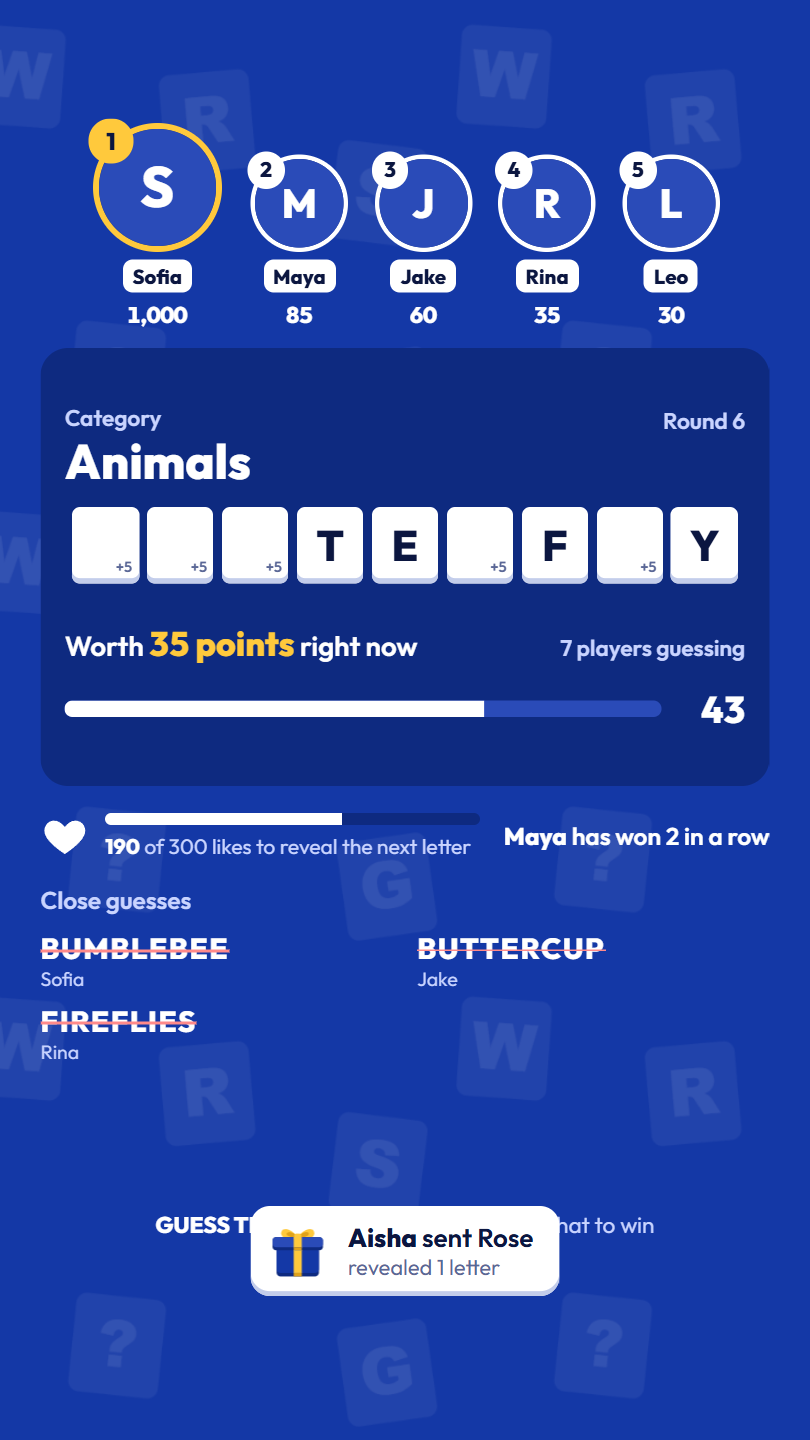
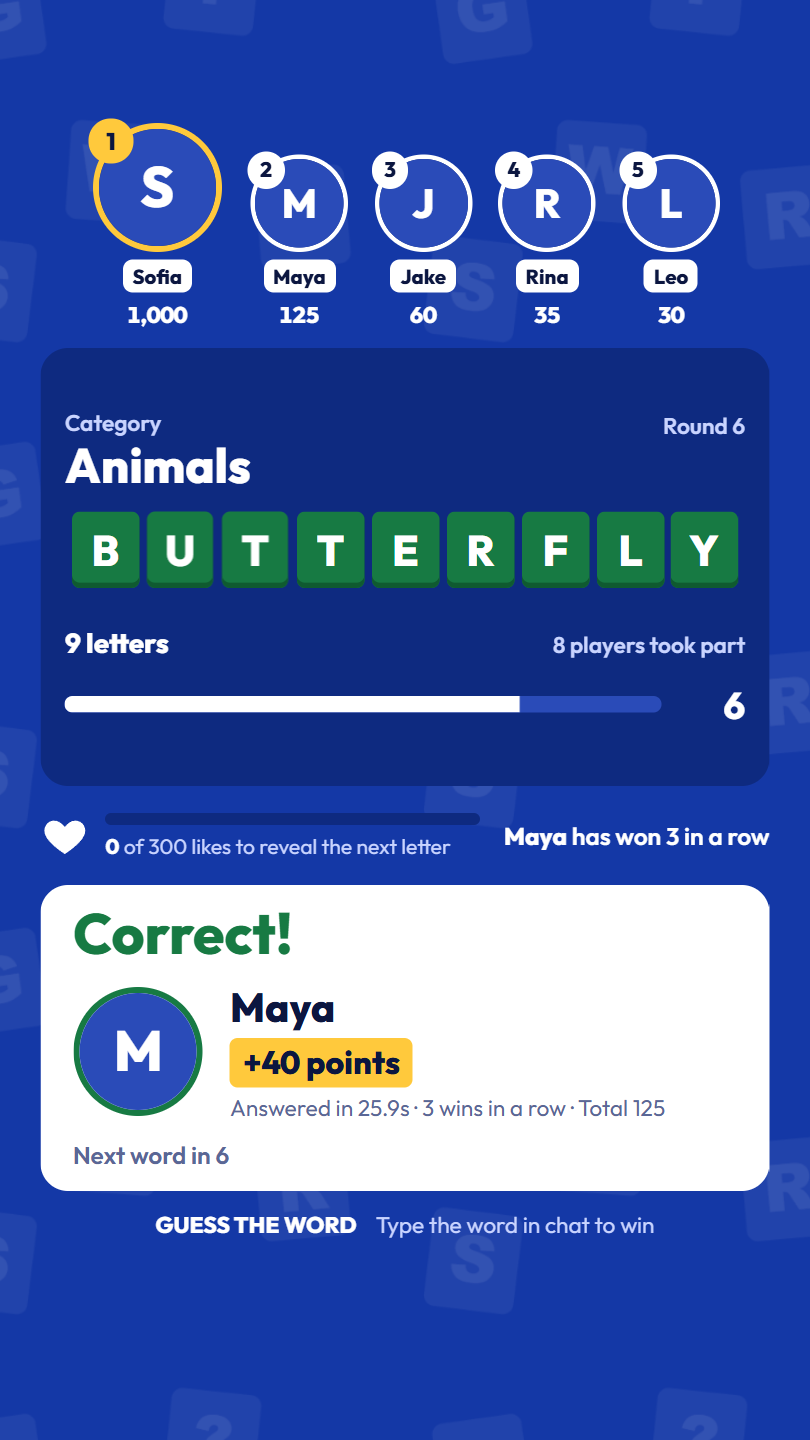
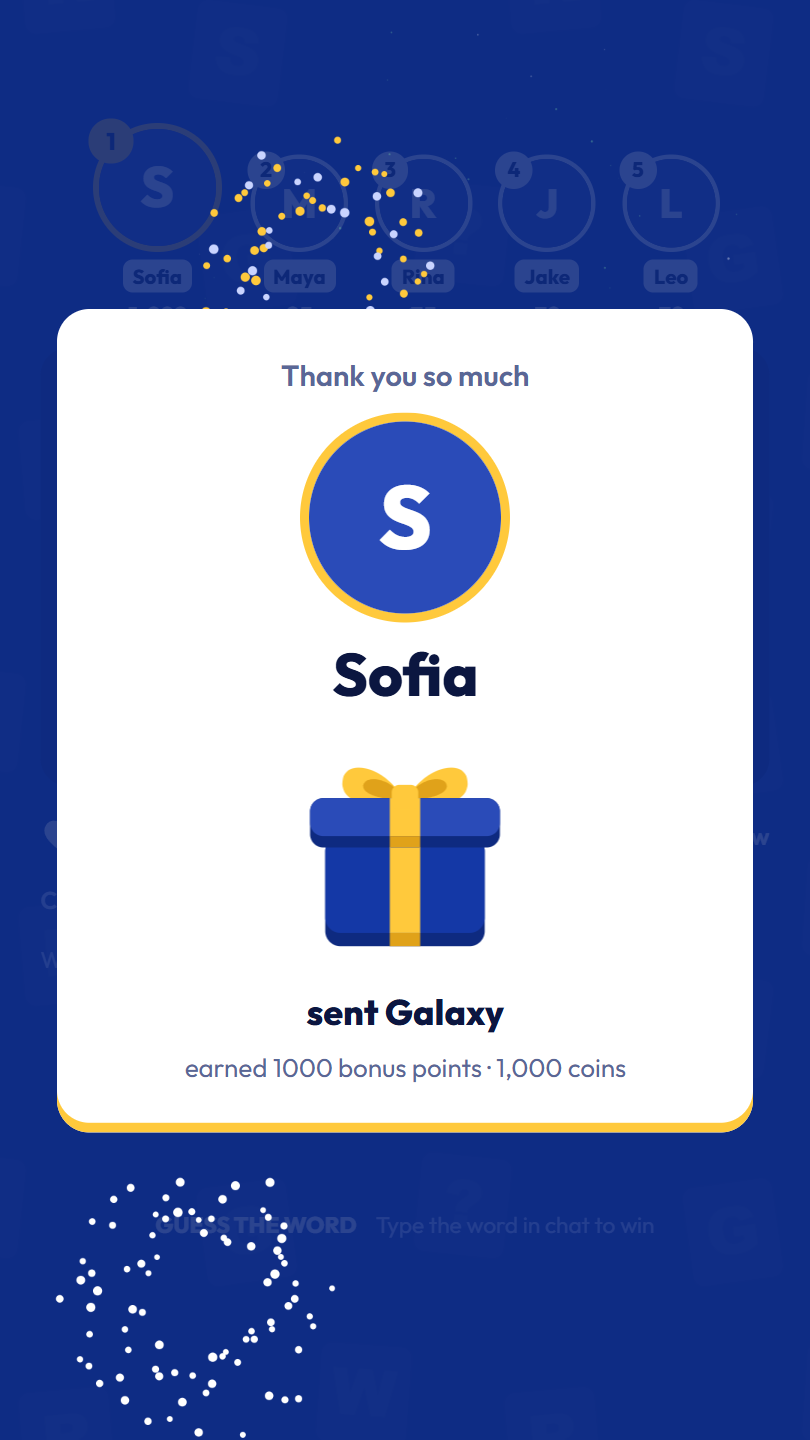
A hidden word appears on screen as blank tiles with its category as the hint. Letters open one by one, and the first viewer to type the full word in chat wins the round. Each blank tile shows how many points it is still worth, so the prize visibly drops as letters open. The top of the screen shows the best players, and every gift gets a thank-you on screen: the bigger the gift, the bigger the celebration.
The game runs on your own computer. A small Python server connects to your LIVE and runs the game, and the game screen is a web page you add to OBS as a Browser Source. No coding is needed.
What's included
- 1,708 English words in 25 categories, and an editor to add your own words and categories.
- A top-players row, win streaks, and scores that are kept when the server restarts.
- All 401 gifts in the list, each with its own action: reveal letters, add time, give points or skip the word.
- Three sizes of gift thank-you: a notification, a banner with fireworks and a full-screen spotlight.
- A like meter that opens a letter every 300 likes.
- An Admin Panel to run the round, follow everything that happens, queue your own words and test without going live. It works on a phone too.
- Seven original sound effects you can replace with your own.
2. Quick start
- Install Python 3.10 or newer (tick "Add Python to PATH" on Windows).
- Open the
Sourcefolder and double-clickSTART_GAME.bat. - Copy the password shown in the server window.
- In OBS, add a Browser Source with the URL
http://localhost:5000, 1080 × 1920. - Open
http://localhost:5000/admin, log in, and try the game with Test without going live. - Go live, then type your username in the TikTok tab and click Connect.
3. Requirements
- Windows 10 or 11 (tested on Windows 11). A start script for macOS and Linux is included.
- Python 3.10 or newer.
- OBS Studio, Streamlabs Desktop or another app with a Browser Source.
- An internet connection and a TikTok account that can go LIVE. The game never asks for your TikTok password.
4. Installation
Windows
- Extract the zip file.
- Open the
Sourcefolder and double-clickSTART_GAME.bat. - The first start installs the Python packages it needs (about a minute), then starts the server.
macOS, Linux, or by hand
- Open a terminal in the
Sourcefolder. - Install the packages:
pip install -r requirements.txt - Start the server:
python app.py(orbash start_game.shon macOS and Linux).
The server window
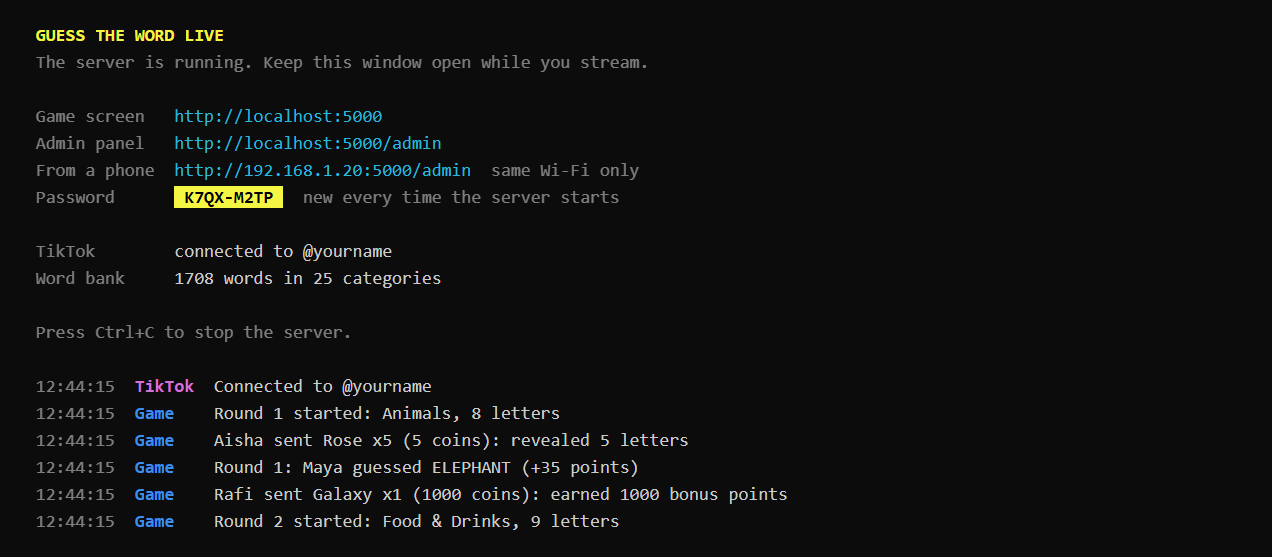
- Game screen and Admin panel: the two addresses you need.
- From a phone: open the Admin Panel from a phone on the same Wi-Fi.
- Password: the Admin Panel password for this run.
- Below the summary, every round, winner, gift and connection change is listed with the time.
5. Admin password
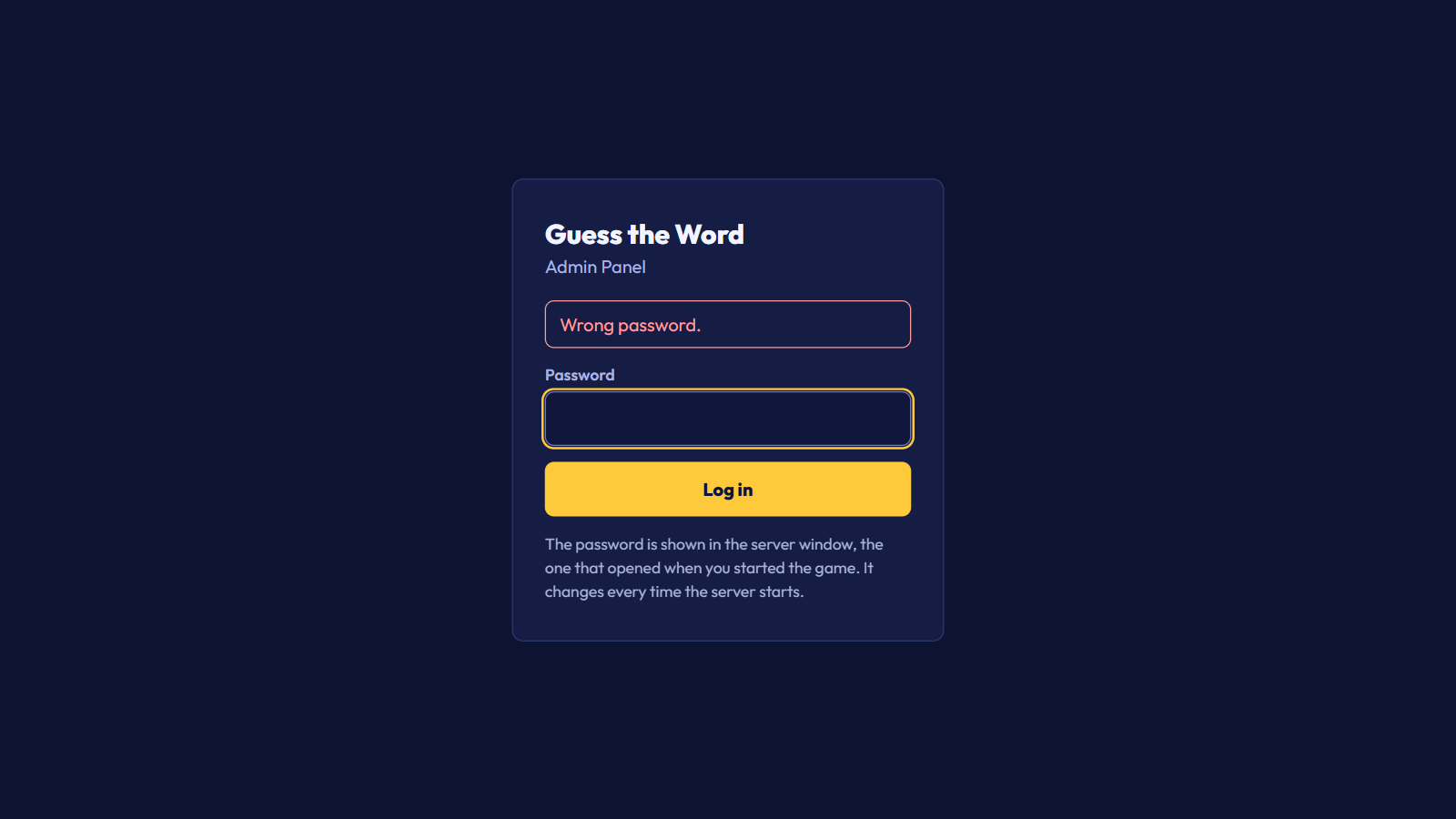
There is no default password. Every time the server starts, it creates a new random password and shows it in the server window, next to Password. Capital letters and the dash are optional: k7qxm2tp works for K7QX-M2TP.
Forgot it or closed the window? Restart the server and use the new one. A browser that is already logged in stays logged in after a restart.
GTW_ADMIN_PASSWORD environment variable before starting the server. On Windows: set GTW_ADMIN_PASSWORD=YourPassword and then python app.py in the same window.6. OBS setup
- In OBS, open the scene you stream with.
- Under Sources, click
+and choose Browser. - Set the URL to
http://localhost:5000/, the width to1080and the height to1920. - Tick Control audio via OBS to mix the game sounds in OBS.
The game screen is always 9:16. In a normal browser window it stays 9:16 with black bars at the sides. For a horizontal stream, keep the source at 1080 × 1920 and scale it down in OBS.
The top 8.5% and bottom 14% of the screen are kept mostly empty, because TikTok shows its own header, chat and gift bar there on viewers' phones.
7. Connecting to TikTok
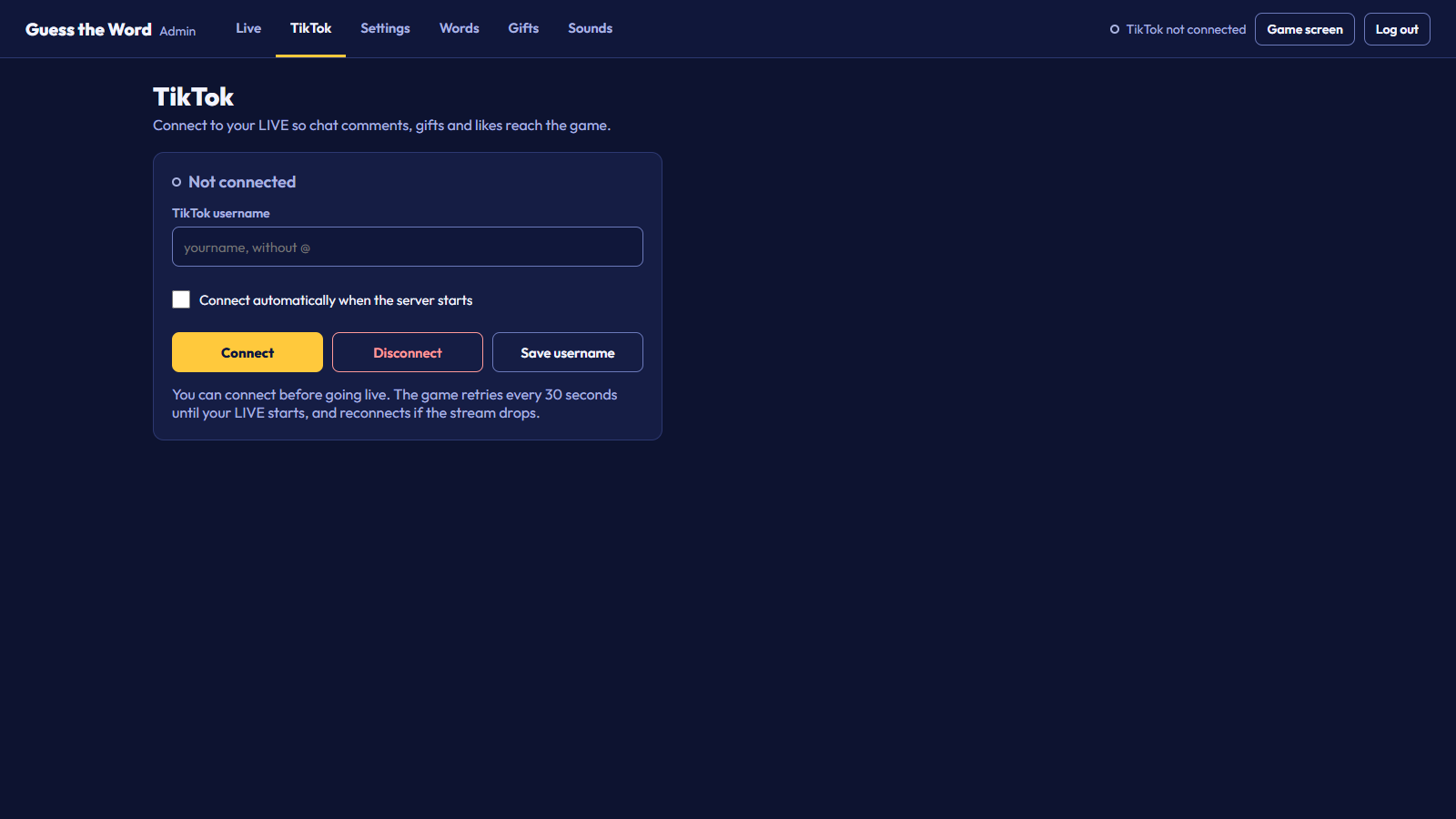
- In the Admin Panel, open the TikTok tab.
- Type your username without the
@. - Tick Connect automatically when the server starts to connect on its own every time, and click Save username.
- Click Connect.
You can connect before you go live: the status says "Waiting for your LIVE" and the game retries every 30 seconds. If the stream drops, it reconnects by itself. The connection status is also shown at the top right of every Admin Panel tab.
About the connection
The game reads your LIVE through TikTokLive, an open-source library that uses TikTok's unofficial live data. TikTok does not offer an official API for this, so it can change or rate-limit that data at any time, which can stop the connection until the library is updated.
TikTokLive signs each connection through a third-party service, Euler Stream. Its free plan has a daily request limit; if connections start failing with a rate-limit message, wait a few minutes, or add a key from Euler Stream.
Possible ongoing cost. The game runs on Euler Stream's free plan without a key. If you stream often or keep hitting the limit, you may need a paid plan: a monthly subscription billed by Euler Stream at their own prices, which can change. It is not included in the price of this item. You are responsible for any costs and account requirements needed to go live and stay connected.
TikTok is a trademark of ByteDance Ltd. This item is not made, endorsed or supported by TikTok.
Using a signing key
Set the key in the SIGN_API_KEY environment variable before you start the server:
To keep using START_GAME.bat, add the line set SIGN_API_KEY=your-key-here to it, right under cd /d "%~dp0".
Every environment variable the game reads is listed in Environment variables.
8. Connection status and debugging
The game shows the state of its TikTok connection in three places, so you can see at a glance whether chat, likes and gifts are coming in, and why when they are not.
Where to see it
- Top right of every Admin Panel tab: a short status with a colored dot: Live: @username, TikTok connecting, Waiting for your LIVE, TikTok error or TikTok not connected.
- TikTok tab: the full status message, with the reason when a connection fails. Every change is also added to the Activity list on the Live tab.
- Server window: every connection attempt, connection, retry and error with the time, in lines tagged
TikTok. Warnings are yellow and errors red, with the full message from TikTok, TikTokLive or the signing service.
What each status means
| Message in the TikTok tab | What it means | What to do |
|---|---|---|
| Connected to @username | The game receives chat, likes and gifts from your LIVE. | Nothing. |
| Connecting to @username... | A connection attempt is running. | Wait a few seconds. |
| @username is not live yet. Retrying every 30s... | The account exists, but no LIVE is running. | Start your LIVE. The game connects on its next try. |
| The LIVE has ended. Waiting for the next one... | TikTok reported the end of your LIVE. | Nothing. The game keeps trying every 30 seconds and connects when you go live again. |
| Connection closed. Reconnecting in 30s... | The connection dropped, for example after a network hiccup. | Nothing. It reconnects by itself. |
| TikTok user @username was not found. Check the username. | No TikTok account has this username. The game stops trying. | Type the username without the @, exactly as on your profile, and click Connect. |
| Connection failed (error name). Retrying in 30s... | The attempt failed. The name in brackets says why. | See the table below. The game keeps retrying every 30 seconds. |
| TikTokLive is not installed. Run: pip install -r requirements.txt | The Python packages are missing. | Run that command in the Source folder and start the server again. |
| Not connected, or Disconnected | No connection was started, or you clicked Disconnect. | Click Connect. |
Error names
| Error name | Usual cause | What to do |
|---|---|---|
SignatureRateLimitError | The free Euler Stream plan's limit was reached. | Wait; the game retries on its own. If it happens often, add an Euler Stream key with SIGN_API_KEY. Paid plans are a monthly cost. |
PremiumEndpointError | The signing request needs a paid Euler Stream key. | Add a key from a plan that includes it. |
SignAPIError, UnexpectedSignatureError, SignatureMissingTokensError | The signing service is down, or answered something TikTokLive did not expect. | Wait a few minutes. If it goes on for hours, TikTok or the signing service has probably changed; check the item page for an update. |
AgeRestrictedError | TikTok marks the LIVE as age-restricted, and its data is not available without signing in. | Remove the age restriction from your LIVE. |
WebcastBlocked200Error | TikTok refused the request from this network. | Wait and try again later, or try another internet connection. |
ConnectError, ConnectTimeout, ReadTimeout, OSError, TimeoutError | No internet, or a firewall or VPN blocks the connection. | Check the internet connection and allow Python through the firewall. |
ConnectionClosedError and other WebSocket errors | The live connection was cut. | Nothing. It reconnects by itself. |
When nothing comes in
- Check that your LIVE is running on the same account you typed in the TikTok tab.
- Read the status in the TikTok tab and the
TikToklines in the server window. Yellow and red lines say what went wrong. - Send a test comment, like or gift with the Admin Panel's test tools. If the game reacts, the game and OBS are fine and only the TikTok connection needs attention.
- Click Disconnect and then Connect to start a fresh attempt.
- If the status does not change for a few minutes, restart the server.
- When you ask for support, copy the
TikToklines from the server window into your message. They contain the full error.
9. Environment variables
None are required: the game runs with no environment variables set. These optional ones change how it starts.
| Variable | Required | Default | What it does |
|---|---|---|---|
SIGN_API_KEY | No | Not set: the free Euler Stream plan | Your Euler Stream API key. TikTokLive signs connections with it, with your plan's higher limits. Paid plans are a monthly cost billed by Euler Stream. |
SIGN_API_URL | No | Not set: Euler Stream's server | The address of another signing server that works with TikTokLive. For advanced users only. |
GTW_ADMIN_PASSWORD | No | Not set: a new random password every start | Uses this Admin Panel password on every start instead of a random one. Leave it unset unless you need a fixed password, and never share it. |
NO_COLOR | No | Not set: colored output | Any value, for example 1, turns off the colors in the server window, which helps when you save its output to a file. |
GTW_GIFT_IMAGES | No | Not set: gift pictures are loaded from TikTok at start | 0 stops the server from loading TikTok's gift list, so gifts show a plain gift box until they arrive in your LIVE. See Gift pictures. |
How to set one
A variable set this way lasts until the window is closed. To set it every time, add set NAME=value on its own line in START_GAME.bat, right under cd /d "%~dp0", or export NAME=value in start_game.sh, under its cd line.
10. How to play
A round
- A new word appears as blank tiles, with its category as the hint. One letter is shown from the start.
- Every 12 seconds another letter opens, until half the word is visible.
- The first viewer to type the full word in chat wins.
- If nobody gets it in 60 seconds, the answer is shown with the missed letters in red, and a new word starts after 7 seconds.
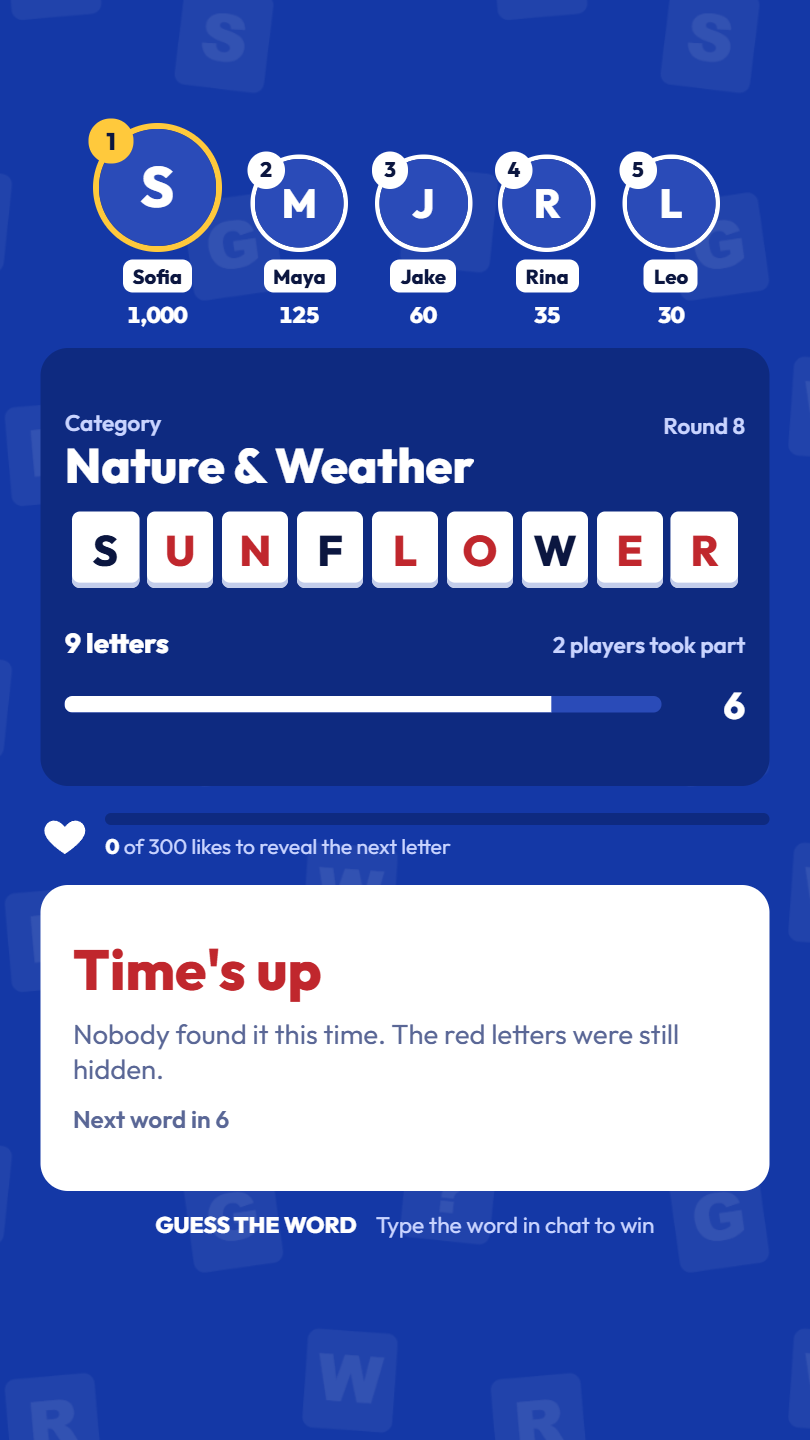
All of these numbers can be changed in Settings.
What counts as a correct answer
The comment must be the word itself. Capitals, spaces, punctuation, emoji and accents don't matter, so for ICE CREAM all of these count: ice cream, IceCream!!, ice-cream. A sentence like is it ice cream? doesn't count, which keeps it fair and stops people pasting long lists of guesses.
Points
The winner gets 10 points, plus 5 for every letter still blank, plus 5 for each win in a row. Guessing with 5 blank letters on a 3-win streak scores 10 + 5 × 5 + 5 × 2 = 45 points. The prize line under the tiles always shows what the word is worth right now.
On screen
- Top players: the best scores, largest circle first. Players slide to their new place when the order changes.
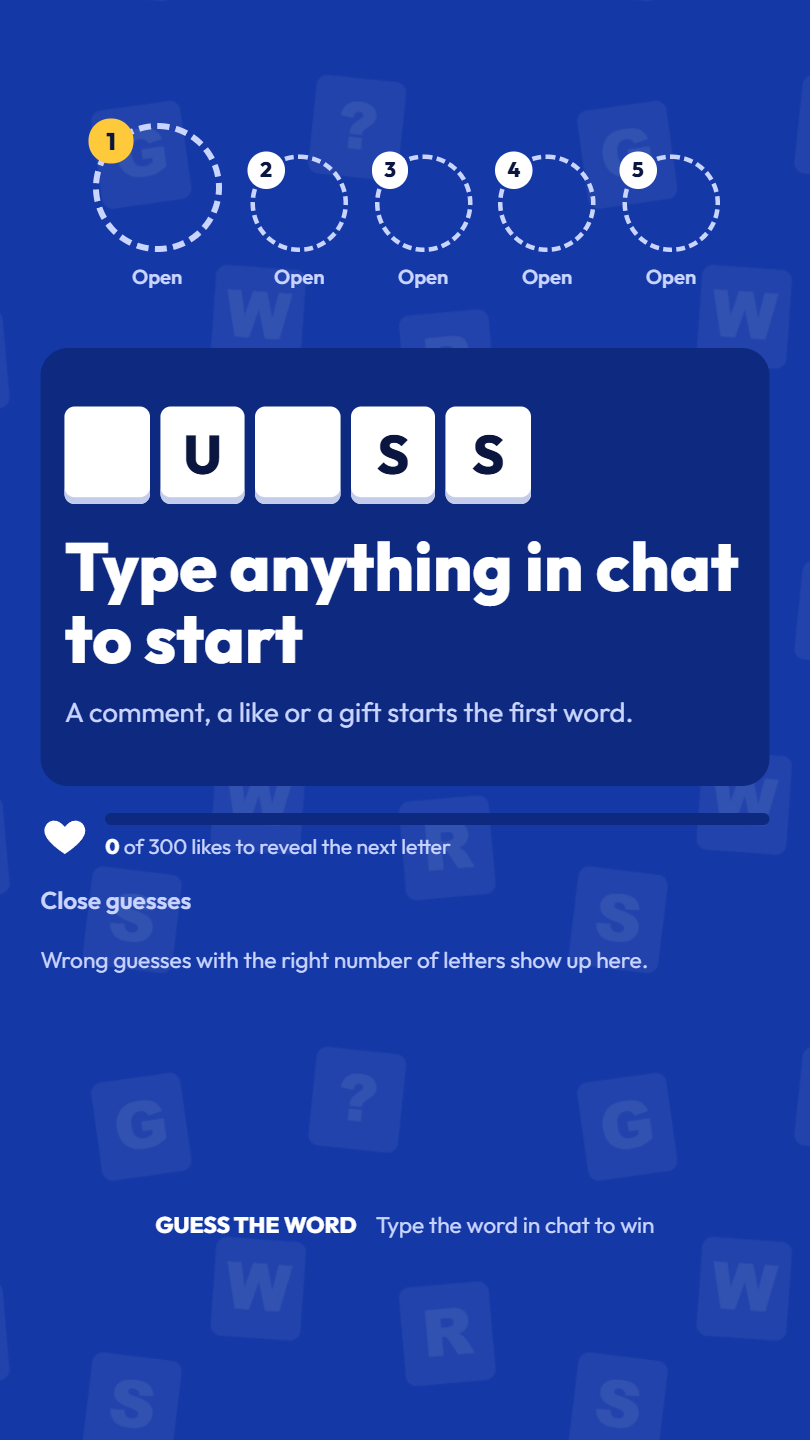
- Close guesses: wrong guesses with the right number of letters, so viewers see what has been tried.
- Like meter: fills as viewers tap the screen. Each time it fills, hearts burst out and a letter opens.
- Streak: appears when someone wins two rounds in a row.
Pausing
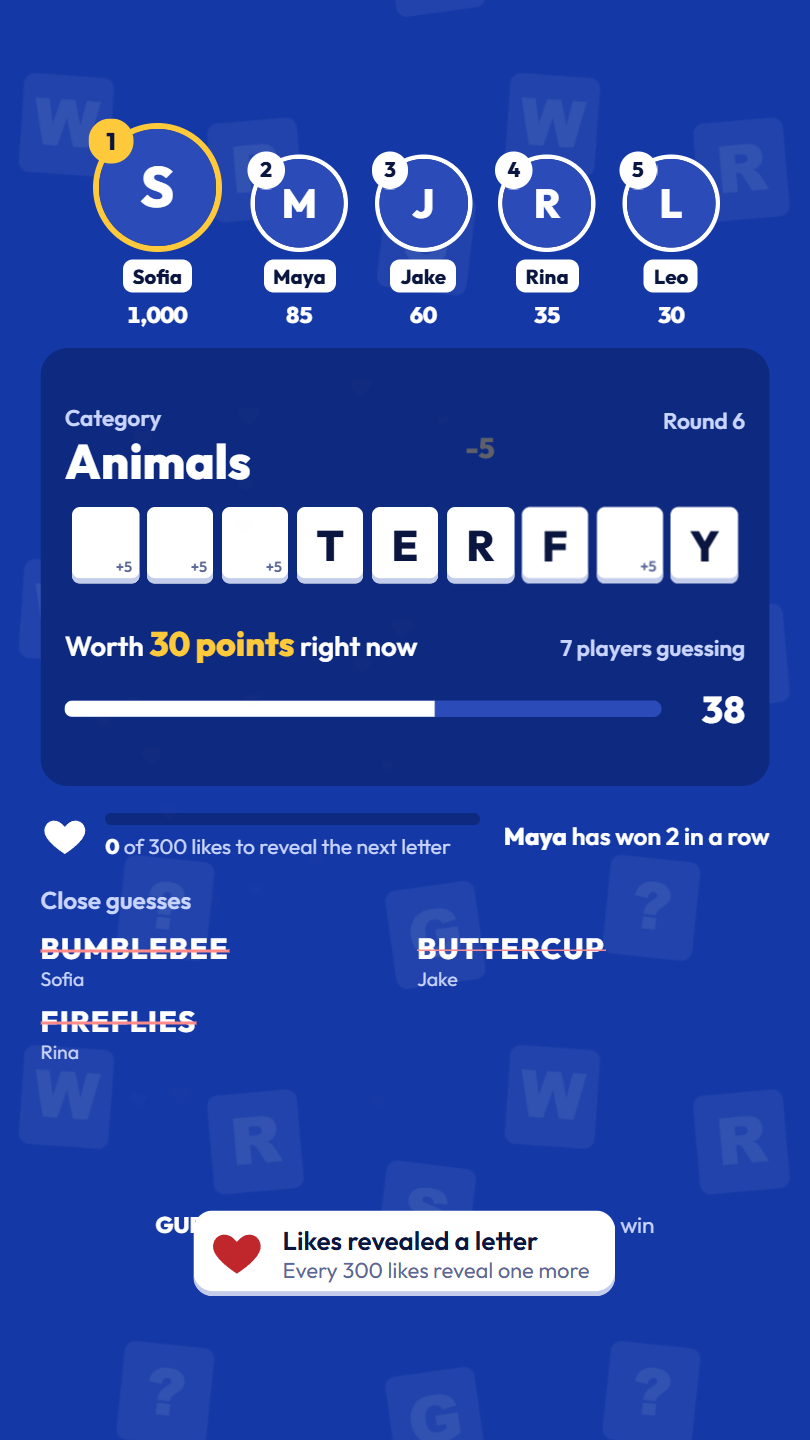
Press Pause in the Admin Panel to freeze the timer, for example while you talk to chat. The screen shows a Paused label until you press Resume.
When chat is quiet
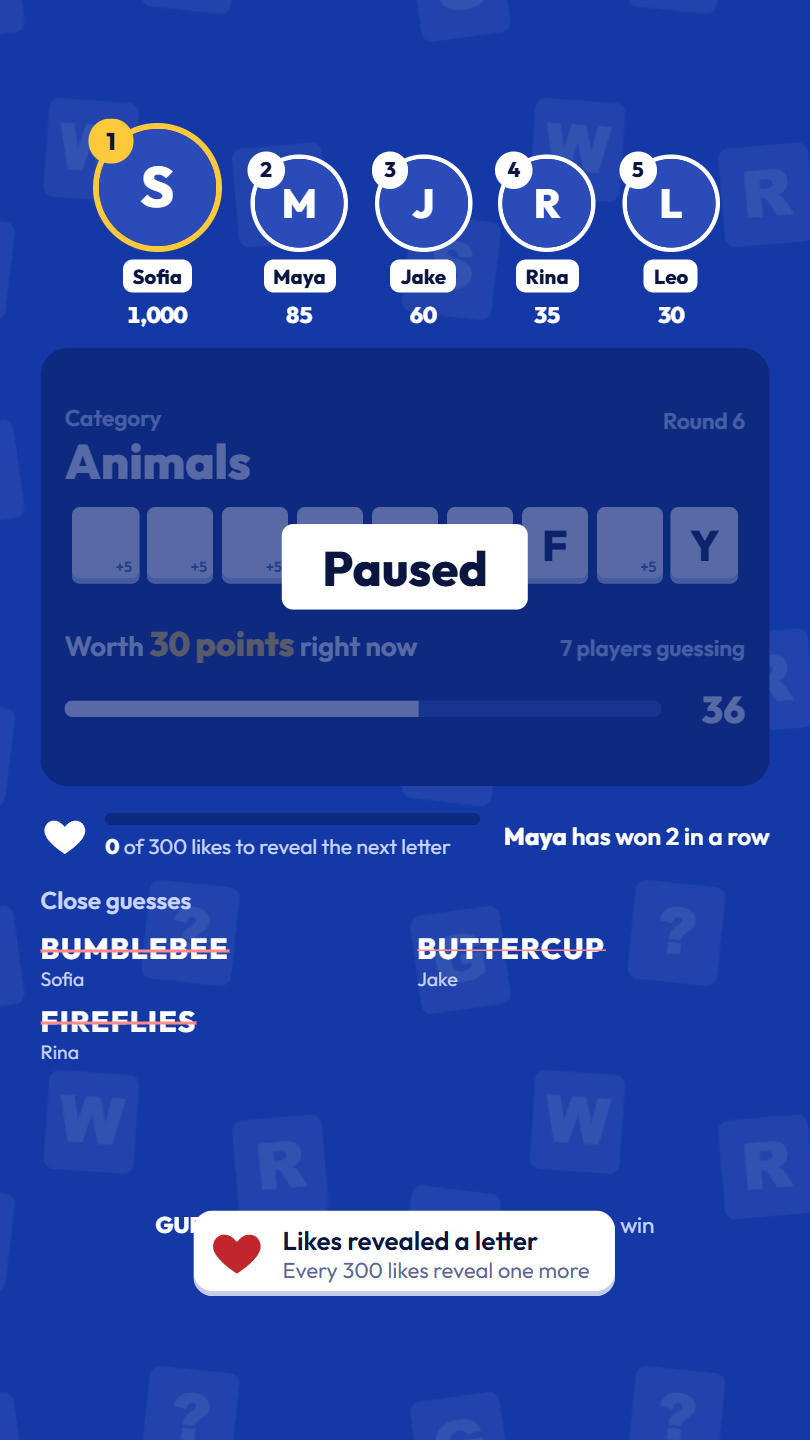
After 3 rounds in a row without any comment, like or gift, the game stops on "Type anything in chat to start", with a demo word flipping its letters so the stream doesn't look frozen. The next comment, like or gift starts a new word. Set "Wait for chat after" to 0 to never stop.
11. Gift thank-yous
Every gift is thanked on screen, sized by its total coin value (a Rose ×10 combo counts as 10 coins):
| Gift value | Thank-you |
|---|---|
| Under 10 coins | A notification near the bottom with the gift's picture. |
| 10 coins or more | A banner at the top with the sender's name and the gift spinning in, plus three fireworks. |
| 500 coins or more | A full-screen spotlight with the sender's photo, the gift, a firework show and its own sound. |
Change both limits in Settings, under Gift thank-yous. Banners and spotlights wait their turn, so each gifter gets a full moment even when several gifts arrive together.
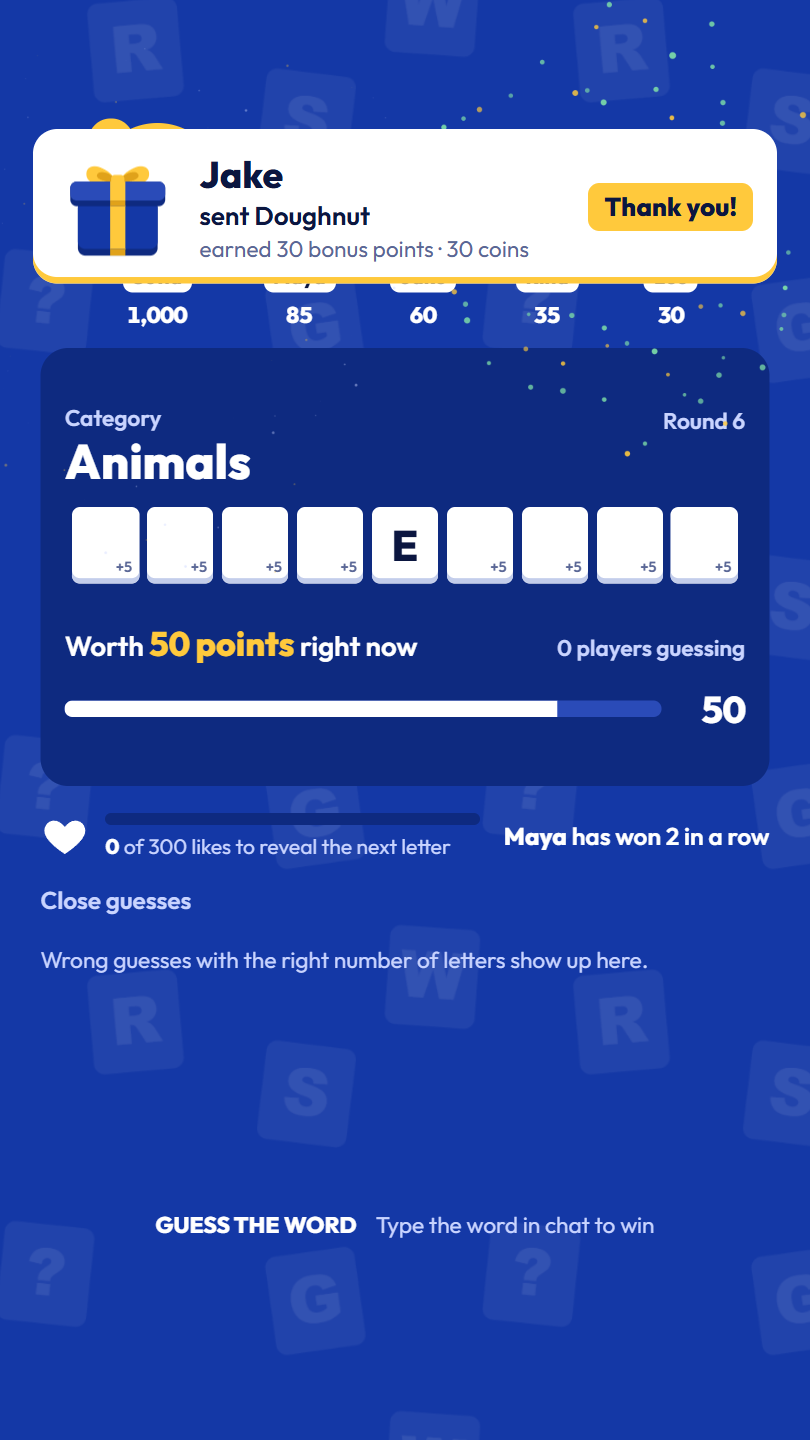
Each gift also has an action that changes the game. See Gifts.
Gift pictures
TikTok's gift artwork is not included in this item. When the server starts, it loads TikTok's public gift list once and uses the pictures from TikTok's own servers in the thank-yous and in the Admin Panel's Gifts tab and test tools; the server window then says Loaded ... gift pictures from TikTok. A gift that is not in that list (gifts differ by region) shows a plain gift box until a viewer sends it during your LIVE, because TikTok sends the picture with every gift. At start, a yellow line in the server window names the gifts in your Gifts tab that are missing from TikTok's list. That is normal for some regional gifts; viewers in your region may not be able to send them. Without an internet connection, or with GTW_GIFT_IMAGES set to 0, every gift shows the plain gift box, as in the screenshots in this guide.
12. Admin Panel
Open http://localhost:5000/admin. The tabs at the top are Live, TikTok, Settings, Words, Gifts and Sounds. Changes apply to the running game straight away, without a restart.
Live
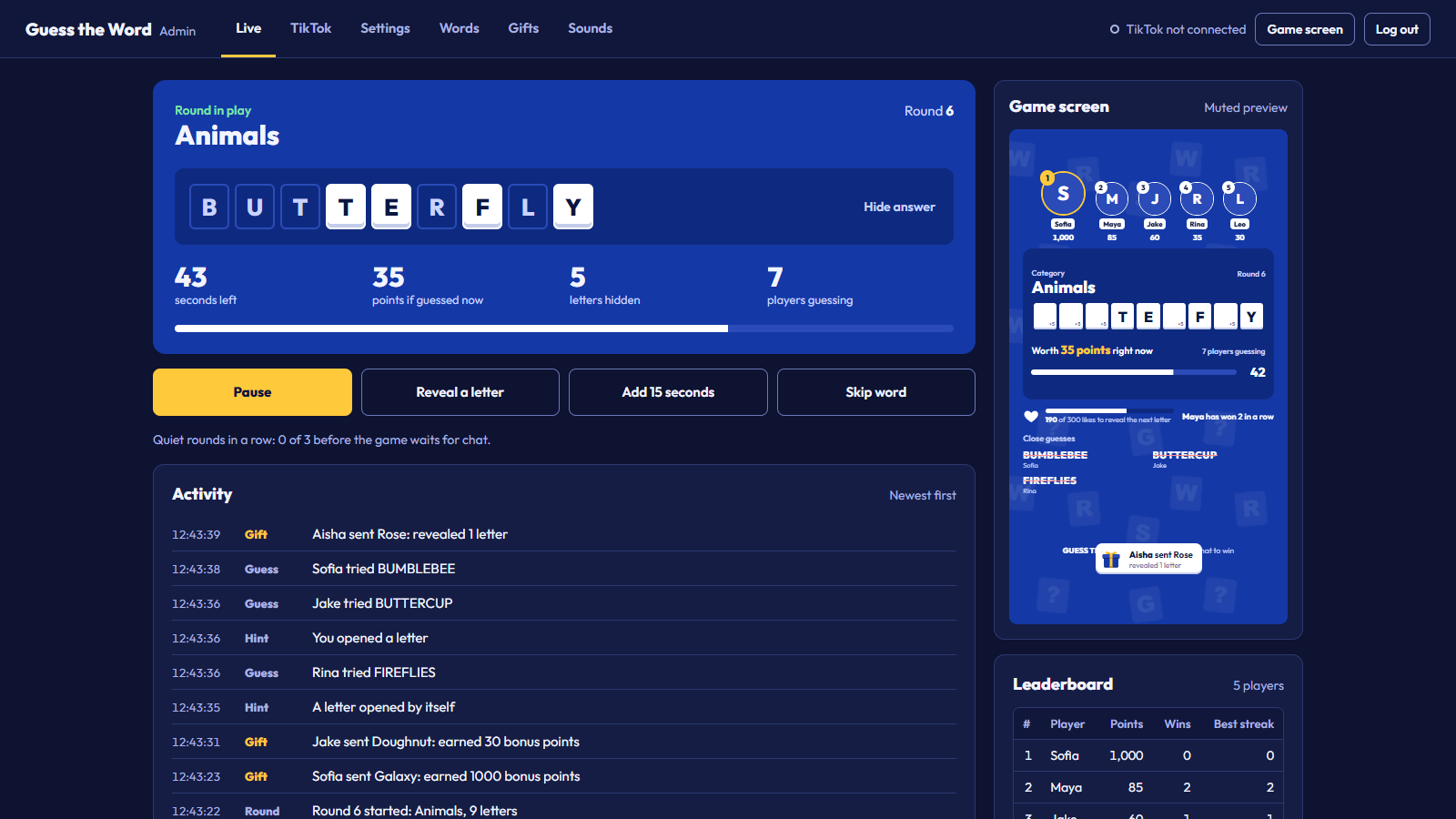
- Round panel: the category and the answer as tiles. White tiles are open on the game screen; outlined tiles are still hidden from viewers. Hide answer blurs it in case your screen is captured. Below are the seconds left, what a correct guess is worth right now, the letters still hidden and the number of players guessing.
- Buttons: only the ones that apply are shown. Between rounds: Start a round and Pause. During a round: Pause, Reveal a letter, Add 15 seconds and Skip word.
- Activity: everything as it happens, newest first: rounds, winners, gifts, hints, close guesses and TikTok connection changes.
- Game screen: a muted preview of what viewers see.
- Leaderboard: the top 50 players with points, wins and best streak. Reset leaderboard clears it.
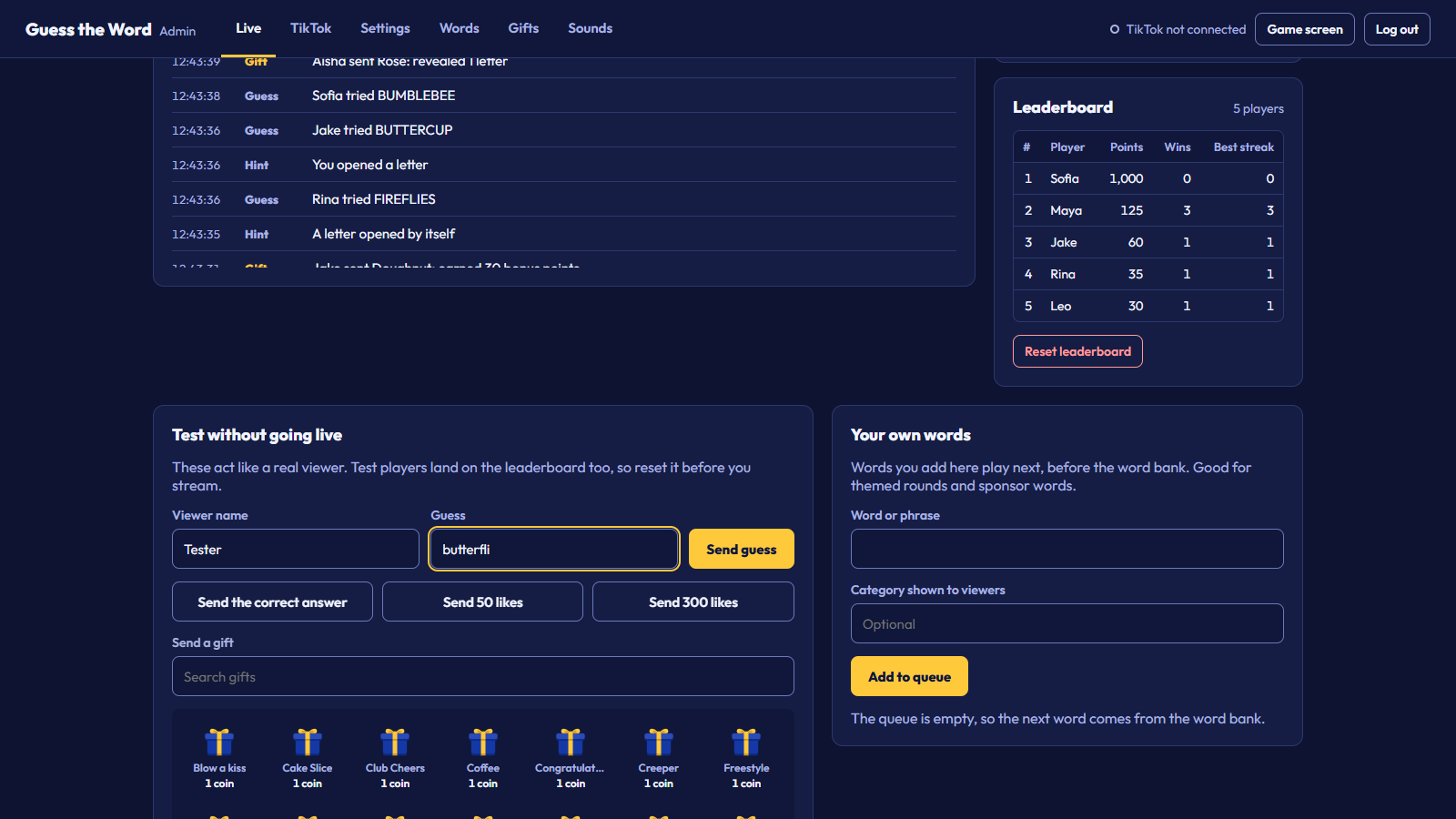
Test without going live
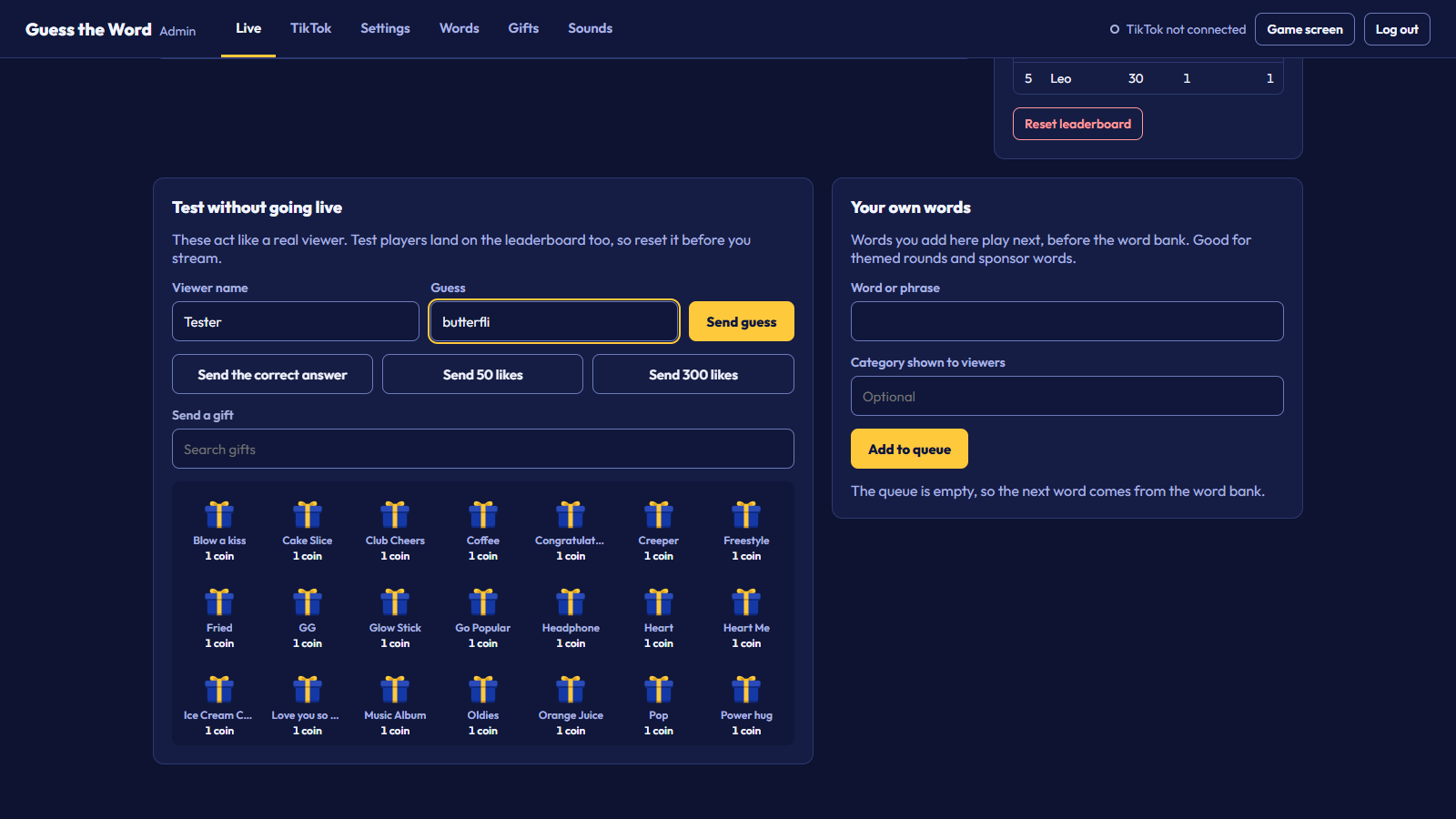
Send guesses, the correct answer, likes and any gift as a test viewer. Test players land on the leaderboard too, so reset it before your stream.
Your own words puts a word at the front of the queue with the category you choose. Use it for themed rounds or sponsor words.
Settings
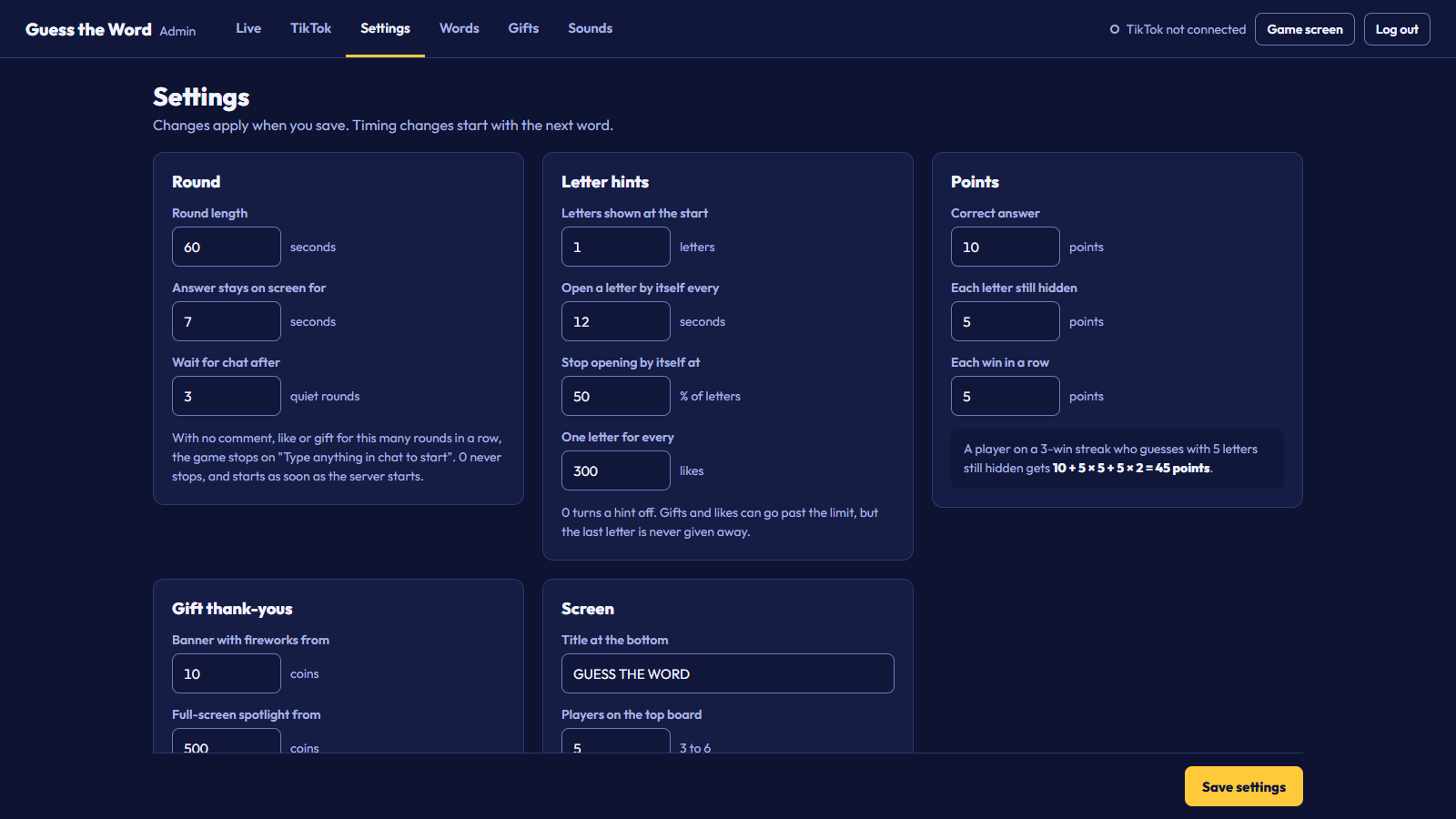
| Setting | Default | What it does |
|---|---|---|
| Round length | 60 seconds | Time to guess each word. |
| Answer stays on screen for | 7 seconds | The break between words. |
| Wait for chat after | 3 quiet rounds | 0 never waits, and starts as soon as the server starts. |
| Letters shown at the start | 1 letter | Free letters when a word appears. |
| Open a letter by itself every | 12 seconds | 0 turns automatic letters off. |
| Stop opening by itself at | 50% of letters | Automatic letters never open more than this. |
| One letter for every | 300 likes | 0 turns the like meter off. |
| Correct answer | 10 points | Base points for the winner. |
| Each letter still hidden | 5 points | Rewards fast guesses. |
| Each win in a row | 5 points | Streak bonus. |
| Banner with fireworks from | 10 coins | See Gift thank-yous. |
| Full-screen spotlight from | 500 coins | See Gift thank-yous. |
| Title at the bottom | GUESS THE WORD | Your game's name on screen. |
| Players on the top board | 5 | 3 to 6 circles at the top. |
| Show close guesses | On | Lists wrong guesses with the right length. |
Words
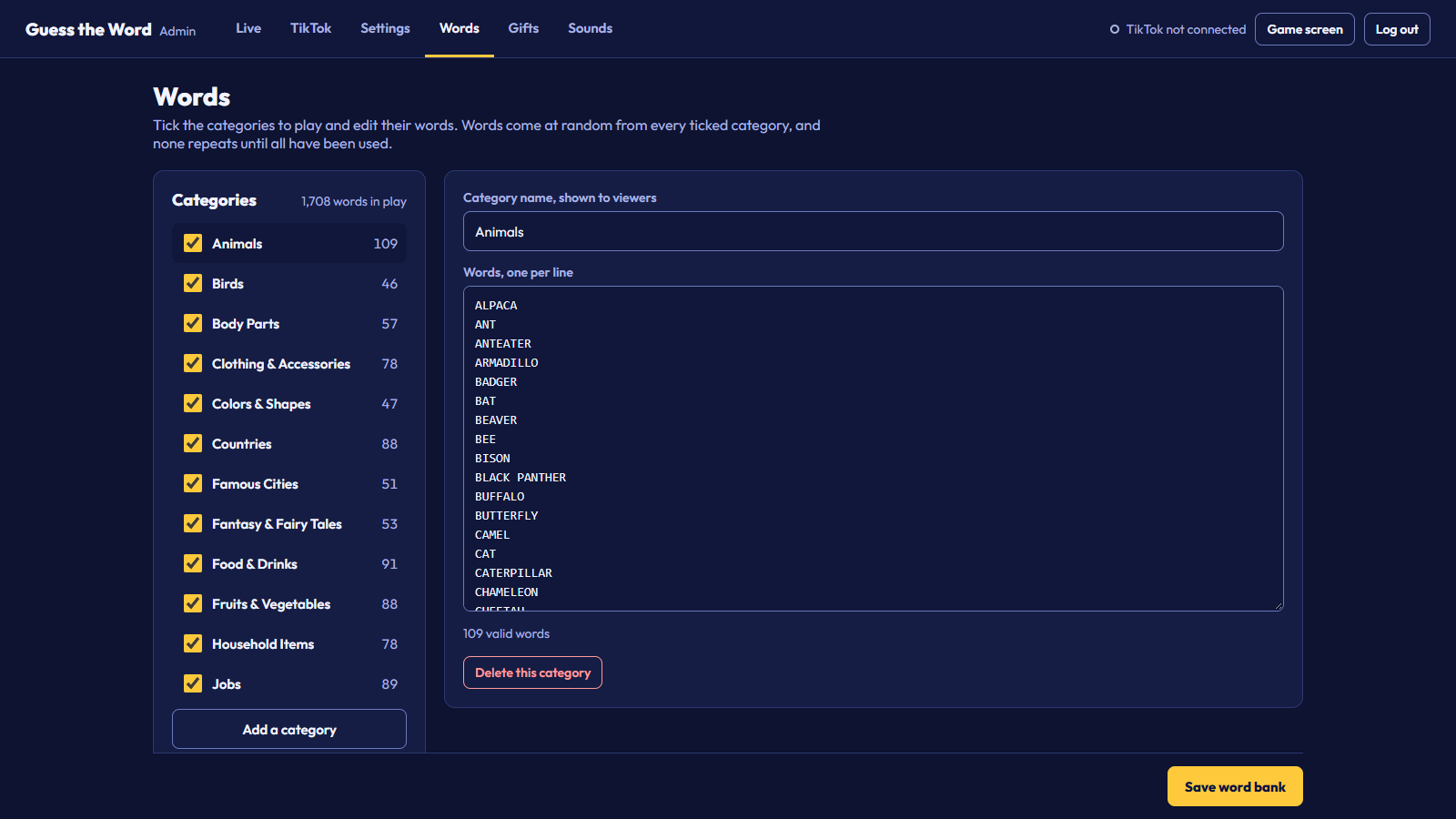
The included categories are Animals, Birds, Body Parts, Clothing and Accessories, Colors and Shapes, Countries, Famous Cities, Fantasy and Fairy Tales, Food and Drinks, Fruits and Vegetables, Household Items, Jobs, Kitchen and Cooking, Music and Hobbies, Nature and Weather, Parties and Holidays, Places and Buildings, School and Office, Sea Creatures, Space and Science, Sports and Games, Technology, Tools and Hardware, Toys and Games, and Transportation.
Tick the categories to play and click one to edit its words, one per line. Words use the letters A to Z only, with spaces between words for phrases like HOT AIR BALLOON; numbers and punctuation are not allowed. Click Save word bank: lines that aren't valid are skipped and listed. Any language written with A to Z works, for example Indonesian.
Gifts
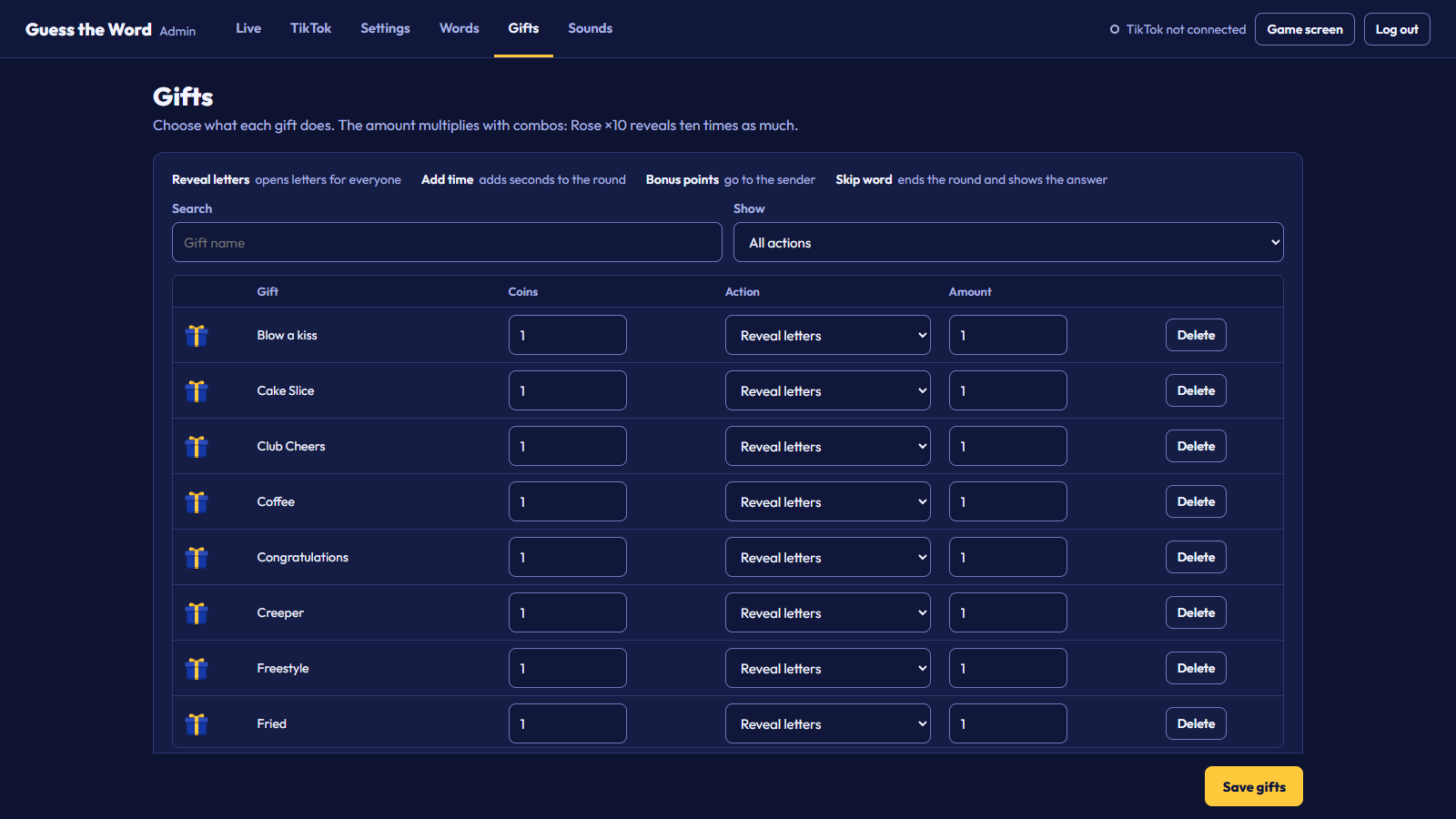
| Action | Amount means | Effect |
|---|---|---|
| Reveal letters | Letters | Opens letters for everyone, never the last one. |
| Add time | Seconds | Adds time to the round, up to twice the round length. |
| Bonus points | Points | Points for the sender. |
| Skip word | Not used | Ends the round and shows the answer. |
| Do nothing | Not used | Only the thank-you. |
Out of the box, gifts under 5 coins reveal a letter and bigger gifts give the sender points equal to their coin value. The amount multiplies with combos. To add a gift that isn't listed, type its exact name as TikTok shows it. The pictures next to the names come from TikTok while the server runs; see Gift pictures.
Sounds
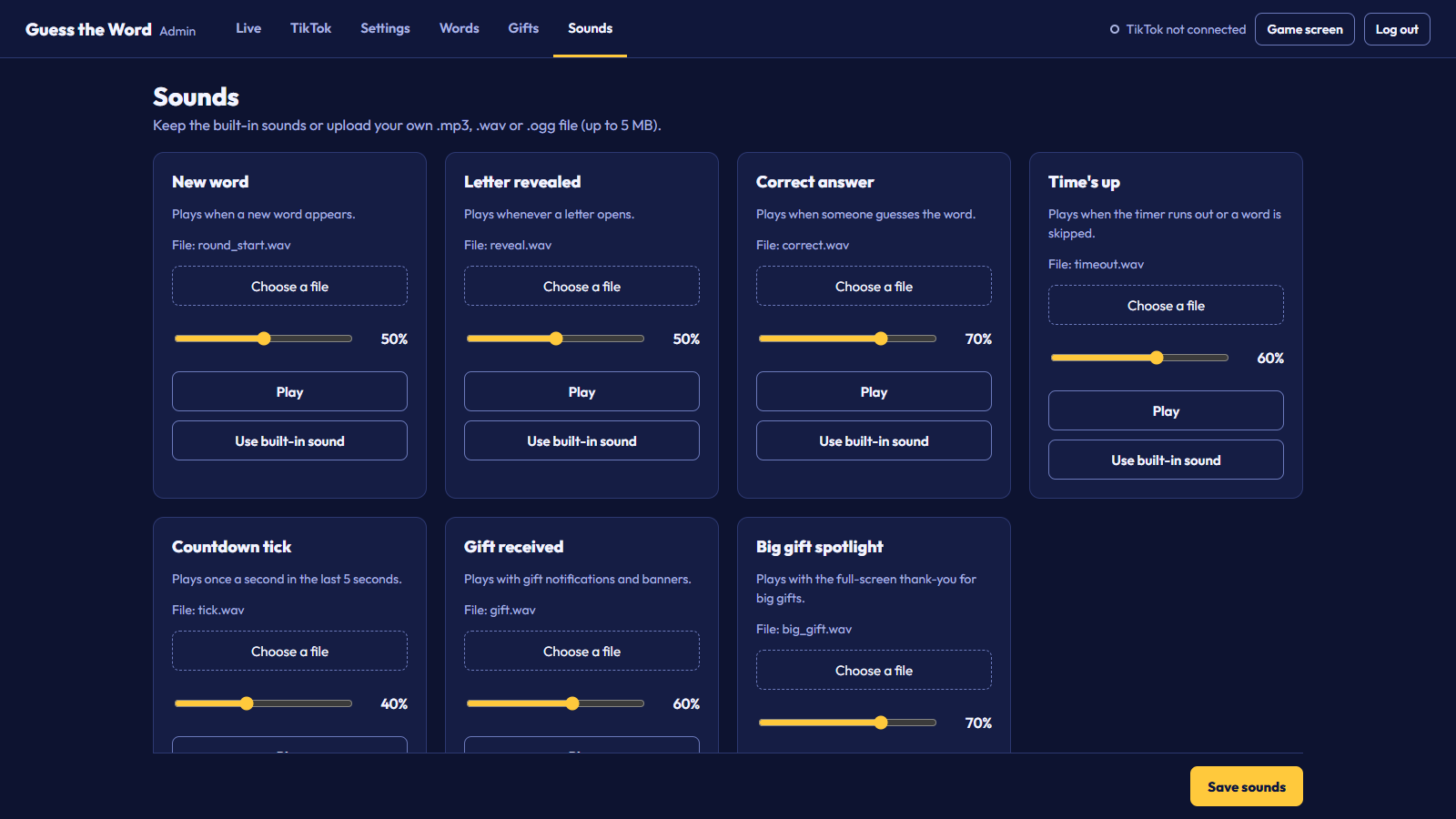
Seven sounds: new word, letter revealed, correct answer, time's up, countdown tick, gift received and big gift spotlight. Upload your own .mp3, .wav or .ogg (up to 5 MB), set the volume, play it, or go back to the built-in sound, then click Save sounds.
From your phone
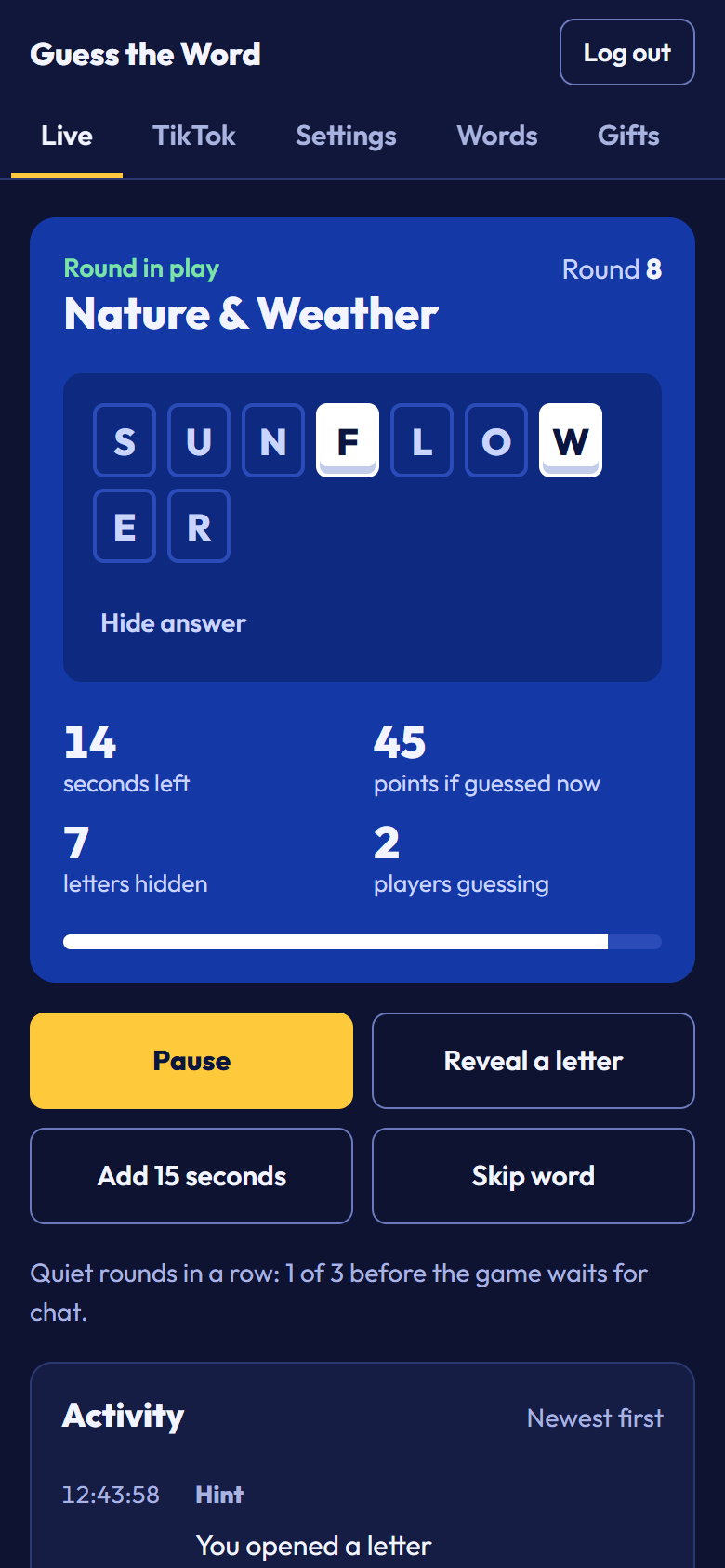
On the same Wi-Fi as your streaming PC, open the From a phone address shown in the server window and log in. If Windows asks whether Python may use the network, allow private networks.
13. How it works
tiktok_connector.py joins your LIVE as a viewer and receives comments, gifts and likes. game_engine.py runs the whole game on the server: words, timer, letters, guesses and scores. Whenever something changes, and once a second, the server sends the current state to every open game screen and Admin Panel. The game screen only draws what it receives, so a refresh, a background tab or a second preview window can never fall out of step.
The game screen never receives the answer before the round ends; only the logged-in Admin Panel does. Every admin action needs a login, and saving settings also needs a CSRF token.
14. Customization
Title
Settings, "Title at the bottom". No code needed.
Colors
The game screen colors are at the top of Source/static/css/game.css, and the Admin Panel's at the top of Source/static/css/admin.css:
Font
The game uses Outfit from Source/static/fonts/. To change it, replace the .woff2 files and update outfit.css.
Logo
The product name is shown as text. To add your logo, put an <img> in the footer of Source/templates/game.html.
Word bank file
You can also edit Source/words.json while the server is stopped:
Port
The server uses port 5000. To run it next to another app on that port, set "server": { "port": 5001 } in Source/tiktok_config.json, restart, and use the new port in OBS.
15. File structure
16. Updating and uninstalling
Updating to a new version
- Stop the server.
- Keep copies of
tiktok_config.json,words.jsonandgame_state.jsonfrom yourSourcefolder. - Replace the
Sourcefolder with the new one, then put the three files back. - Run
START_GAME.bat; it installs any new packages.
Uninstalling
Delete the game folder. To also remove the Python packages it installed, run pip uninstall flask flask-socketio TikTokLive.
17. Troubleshooting
The game screen is blank in OBS
Check that the server window is still open, and start it again if not. Then open the Browser Source properties and click "Refresh cache of current page". If the screen says it can't reach the game server, the server isn't running or the port is different.
I can't log in
Use the password from the current server window; it changes on every start. If you see "Too many failed attempts", wait 5 minutes or restart the server.
TikTok won't connect
Check the username (no @) and that you are live. "Waiting for your LIVE" is normal before the stream starts.
A viewer typed the right word but didn't win
The comment has to be only the word. Another viewer may also have been a moment faster; the Activity log and the server window show who won each round.
No sound
OBS plays sounds by itself. In a normal browser tab, click the page once (a "Click to turn on sound" button appears). Also check the volumes in Sounds and the Browser Source level in the OBS mixer.
Gifts show a plain gift box instead of their picture
The server could not load TikTok's gift list when it started (no internet, or a firewall blocked it), GTW_GIFT_IMAGES is set to 0, or the gift is not in TikTok's list for your region. Check the server window for Loaded ... gift pictures from TikTok or a yellow line about the gift pictures. If the list could not be loaded, the game tries again when it connects to your LIVE, and a gift sent during your LIVE always brings its own picture.
"Address already in use"
Another program, or a second copy of the game, is using port 5000. Close it or change the port.
18. FAQ
Can I try it without going live?
Yes. Use Test without going live in the Live tab.
Can viewers find the answer somewhere?
No. The game screen only receives the letters that are open. The full answer is sent only to the logged-in Admin Panel.
How do I make rounds easier or harder?
In Settings, raise or lower "Letters shown at the start", "Open a letter by itself every", "Stop opening by itself at" and "Round length". You can also untick categories with longer words.
Can I use another language?
Yes, if it is written with the letters A to Z, like Indonesian or Malay. Replace or add words in the Words tab. The game screen labels are in English.
Can I show the game on a second screen?
Yes. Any browser on the same network can open http://<your PC's address>:5000; every screen shows the same round.
What happens if my internet drops?
The game keeps running on your PC, and the TikTok connection comes back by itself when the internet returns.
Does the game need my TikTok password?
No. It only reads public LIVE events (comments, gifts and likes) using your username.
Can I run it on a server (VPS)?
It's made to run on your streaming PC. It can run on a VPS, but TikTok sometimes blocks connections coming from data centers.
19. Credits and licenses
| Item | License | Notes |
|---|---|---|
| Flask 3.0.3 | BSD-3-Clause | Installed from PyPI by requirements.txt |
| Flask-SocketIO 5.3.6 | MIT | Installed from PyPI by requirements.txt |
| TikTokLive 6.6.5 | MIT | Installed from PyPI by requirements.txt |
| Socket.IO client 4.7.2 | MIT | Source/static/js/ |
| SweetAlert2 11.26.25 | MIT | Source/static/js/ |
| Outfit font | SIL Open Font License 1.1 | Source/static/fonts/ |
| Atkinson Hyperlegible Next font | SIL Open Font License 1.1 | Documentation/fonts/ |
| Rubik font | SIL Open Font License 1.1 | Documentation/fonts/ |
| Sound effects | Original work | Made for this item |
| Gift box icon | Original work | Made for this item, Source/static/images/ |
No TikTok artwork is included. Gift pictures are loaded from TikTok's servers while the game runs (see Gift pictures). TikTok is a trademark of ByteDance Ltd. This item is not made, endorsed or supported by TikTok. The same list is in CREDITS.txt.
20. Changelog
Version 1.0.0, October 26, 2026
First release.
21. Support
Questions or a problem not covered here? Use the Support tab on the item's CodeCanyon page and include what you did and what happened, a screenshot of the server window, and your operating system and Python version (python --version).