
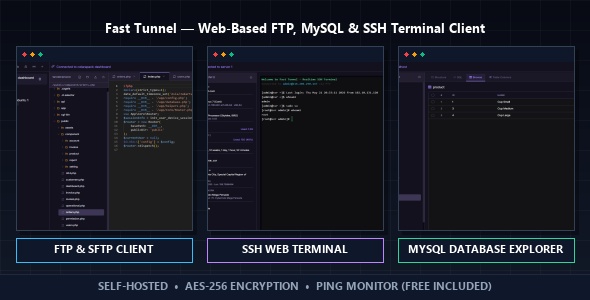
Fast Tunnel is a free, open-source PHP application that consolidates FTP file management, MySQL database administration, and SSH terminal access into a single browser-based dashboard. If you have ever juggled between FileZilla, phpMyAdmin, and PuTTY just to manage a single server, Fast Tunnel was built to solve exactly that problem.
This article covers what Fast Tunnel is, how it works, who should use it, and how to get it running on your own server in minutes.
What Is Fast Tunnel?
Fast Tunnel is a self-hosted web application written in PHP that gives you a complete server management interface inside your browser. Once deployed on a PHP-capable server, it replaces the need for:
- FileZilla — Fast Tunnel includes a full FTP file manager with drag-and-drop upload and a right-click context menu
- phpMyAdmin — Fast Tunnel includes a MySQL client with table browsing, SQL query execution, and row editing
- PuTTY or any SSH client — Fast Tunnel includes a fully interactive SSH terminal powered by xterm.js
Instead of installing and maintaining three separate desktop applications, you access everything through a single URL. This makes Fast Tunnel especially practical on shared machines, remote workstations, or any environment where you cannot or do not want to install software locally.
The project is open source and available on GitHub under the MIT license, meaning you can use it, modify it, and deploy it on as many servers as you need at no cost.
Key Features
FTP File Manager
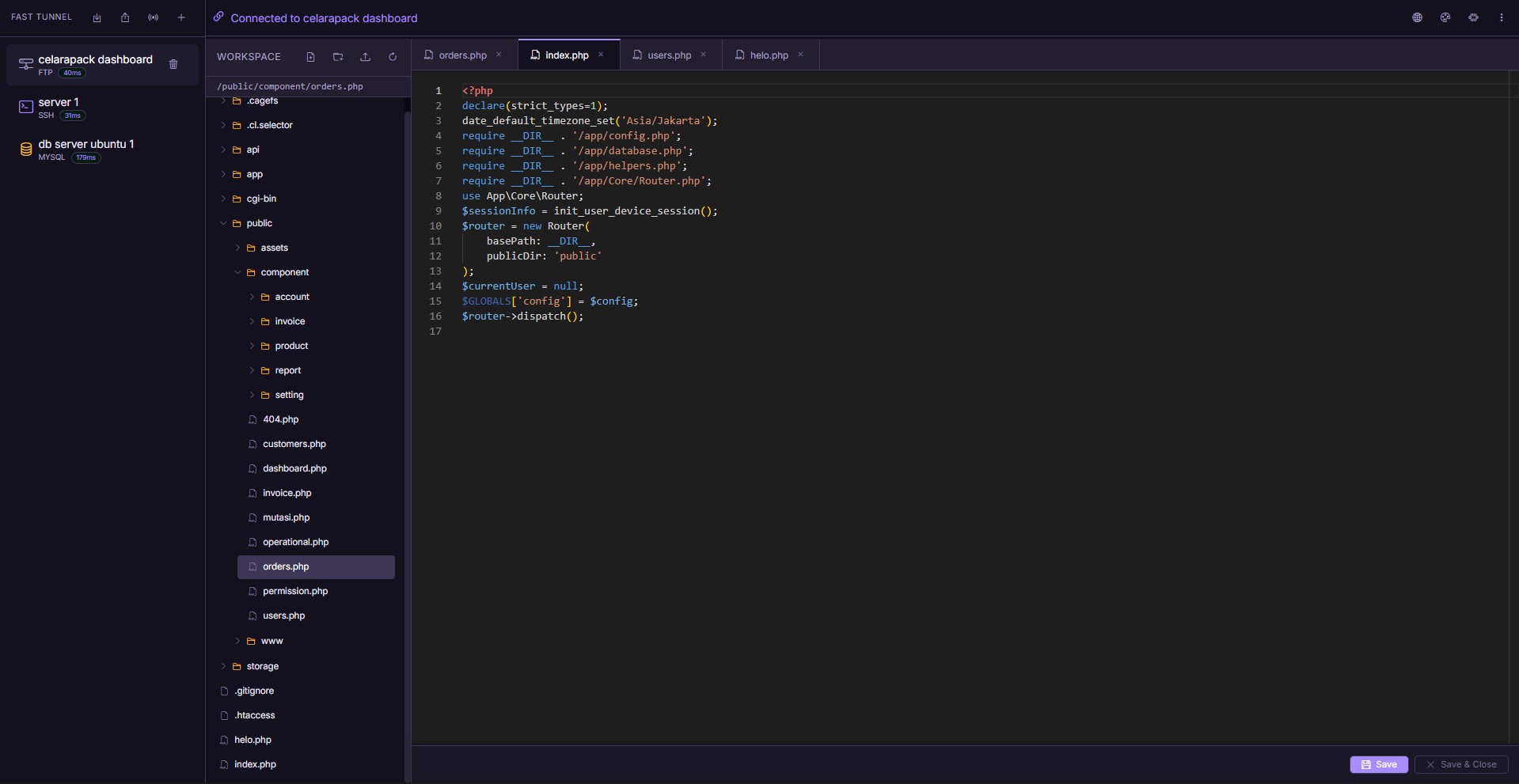
The FTP module in Fast Tunnel gives you a full remote file browser. You can navigate directory trees, upload files by dragging them into the browser window, create new folders, rename files, delete entries, and open any text-based file directly in the built-in code editor.
The code editor is powered by Monaco Editor — the same editor engine used inside Visual Studio Code — which means you get syntax highlighting, line numbering, and a familiar editing experience without leaving the browser.
MySQL Database Client
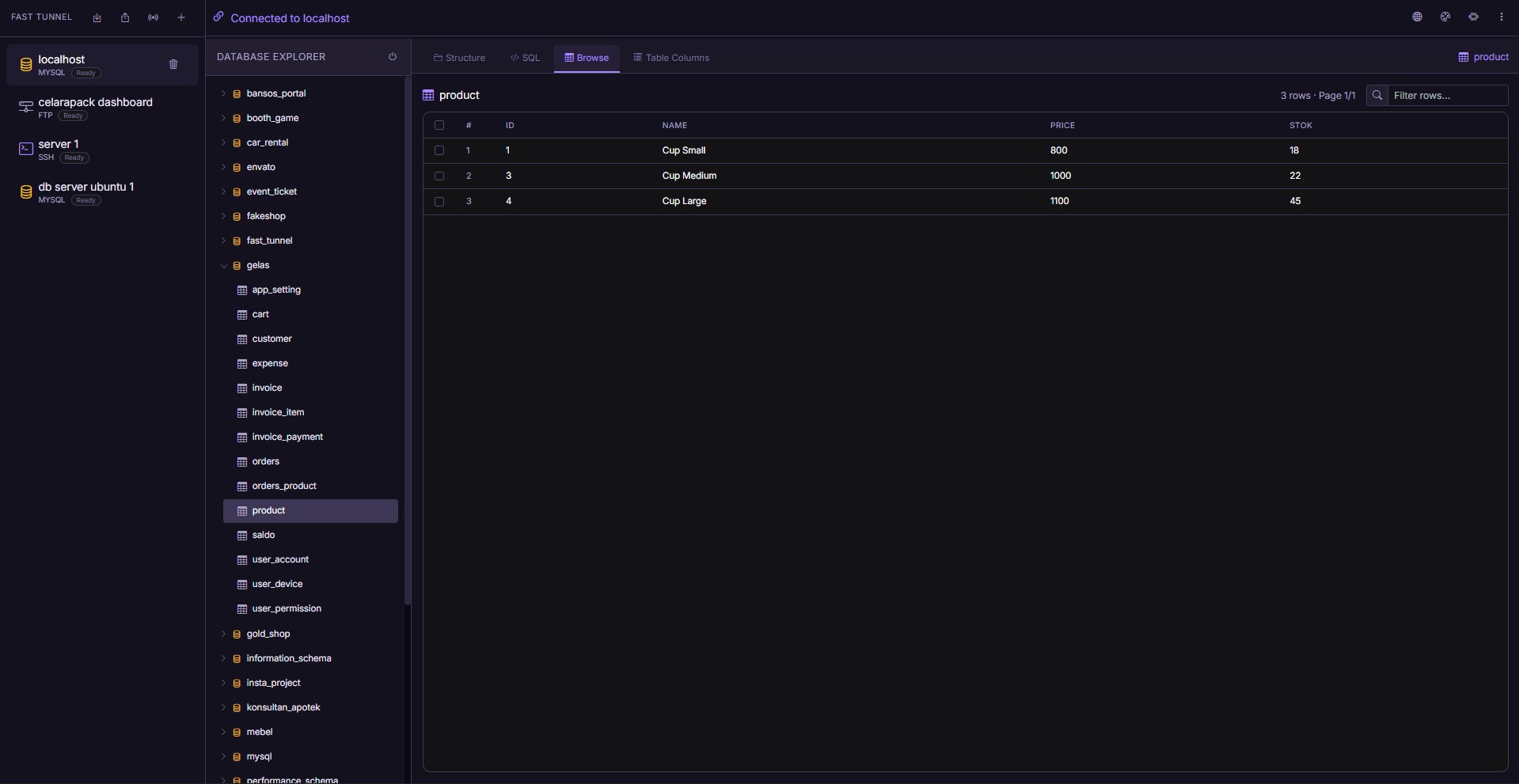
The MySQL module connects to any MySQL 5.7+ or MariaDB 10.3+ instance. From there you can:
- Browse all tables in a database
- View and modify column structures
- Run custom SQL queries through an inline editor with results shown in a formatted grid
- Edit individual rows directly in the interface
- Drop tables or truncate data with confirmation prompts
This makes Fast Tunnel a lightweight and practical replacement for phpMyAdmin in environments where you want something faster and easier to access.
SSH Web Terminal
The SSH terminal in Fast Tunnel is a fully interactive PTY session rendered in the browser using xterm.js. It supports real-time input and output through Server-Sent Events (SSE), which means you can run long-running commands, monitor logs, and work with interactive CLI programs just as you would in a native terminal application.
The terminal uses an adaptive polling mechanism that reduces CPU usage during idle periods, making it efficient to leave open in the background while you work.
Session Management
Fast Tunnel lets you save multiple server connections and switch between them instantly. Sessions are stored with AES-256-GCM encryption. You can also export all sessions to a JSON file for backup or transfer to another device, with optional password protection on the export.
Security Architecture
Security is a first-class concern in Fast Tunnel. The application implements several independent layers of protection:
- AES-256-GCM Credential Encryption: Every FTP, MySQL, and SSH password is encrypted before being held in the PHP session. Credentials are decrypted only at the moment a connection is established and are never written to disk in plaintext.
- CSRF Protection: A cryptographically random token is issued per session and required as a request header on every API call. Requests without a valid token are rejected before any business logic executes.
- SQL Injection Prevention: MySQL identifier inputs — table names, column names, and data types — are validated through a strict whitelist before any query is constructed. All user-supplied values go through parameterized queries.
- Login Rate Limiting: Failed login attempts are recorded per IP address. Repeated failures trigger a lockout period to limit brute-force attacks against the admin login.
- Directory Lockdown: Temporary session files used by the SSH streaming process are stored in a protected directory with an
.htaccessrule that denies all direct HTTP access.
System Requirements
Fast Tunnel runs on any standard PHP web server stack. The minimum requirements are:
- PHP: 7.4 or higher (PHP 8.x recommended)
- Database: MySQL 5.7+ or MariaDB 10.3+
- PHP Extensions:
pdo_mysql,openssl,curl - Web Server: Apache or Nginx with write permission on the application root
It is compatible with XAMPP, LAMP, LEMP, and most shared hosting environments that meet these requirements.
How to Install Fast Tunnel
Fast Tunnel comes with a guided web installer that handles the entire setup automatically. There is no manual database import or configuration file editing required.
Step 1: Clone the repository
git clone https://github.com/arizu-id/fast-tunnel.git
cd fast-tunnel
composer install
Step 2: Place the folder in your web server root
Move the fast-tunnel folder into your server’s web root directory — for example, htdocs/ for XAMPP or /var/www/html/ for Apache on Linux.
Step 3: Run the installer
Open your browser and go to:
http://your-server/fast-tunnel/install/The installer will walk you through three steps:
- System Check — verifies PHP extensions and write permissions
- Database Configuration — enter your MySQL credentials. The installer creates the database and all required tables automatically.
- Admin Account — set your username and password for the Fast Tunnel dashboard
After completing the wizard, log in and start adding your first server connections.
Security note: Delete or restrict access to the
install/directory after installation is complete.
Plugin System
Fast Tunnel includes a modular plugin architecture. Plugins are self-contained folders placed inside the plugins/ directory, and they load automatically on the next page request — no restart or configuration change required.
The core package includes the Ping Monitor plugin at no additional cost. This plugin checks the reachability and response latency of your saved server hosts, so you can confirm at a glance whether a remote server is online before attempting a connection.
Additional plugins for extended functionality — such as multi-language support, visual themes, and proxied connections — are available as separate add-ons.
Who Should Use Fast Tunnel?
Fast Tunnel is a good fit for:
- Web developers who manage their own VPS or cloud servers and want a single tool for FTP, database, and terminal access
- System administrators who need portable access to servers from different machines without installing client software on each one
- Hosting providers and agencies that manage multiple client servers and want a unified management interface
- Students and learners who want to explore server management through a modern, approachable web UI
- Anyone frustrated by switching between FileZilla, phpMyAdmin, and PuTTY for every routine server task
Open Source and Community
Fast Tunnel is released under the MIT License, which means you can use it freely in personal and commercial projects, modify it to suit your needs, and redistribute it without restriction.
The source code is available on GitHub at github.com/arizu-id/fast-tunnel. Contributions are welcome — if you find a bug, want to suggest a feature, or want to submit a plugin, open an issue or pull request on the repository.
If you find Fast Tunnel useful, starring the repository on GitHub helps other developers discover the project.
Conclusion
Fast Tunnel solves a real and common problem: the friction of maintaining multiple desktop tools to manage a single server. By running directly in the browser from your own server, it gives you a consistent, secure, and portable interface for FTP, MySQL, and SSH — without external dependencies or recurring subscription costs.
The project is free, open source, and ready to deploy. You can have it running in under five minutes on any standard PHP server.
Get started: github.com/arizu-id/fast-tunnel
Fast Tunnel is developed and maintained by Arizu Studio.
About The Author