Side War
A trench battle for TikTok LIVE. Blue holds the left, Red holds the right. Viewers join a side from chat, and their likes and gifts send soldiers and tanks that fight on their own, each with the viewer's name above it.
- Version
- 1.0.0
- Released
- October 26, 2026
- Last updated
- November 3, 2026
- Author
- Arief Zufar Hilmi, Arizu Studio
- Support
- Support tab on the CodeCanyon item page
- Website
- arizu.id
This game uses unofficial TikTok data, so the connection can be interrupted. TikTok offers no official API for LIVE comments, likes and gifts. The game reads them through the open-source TikTokLive library, which uses TikTok's unofficial live data, and every connection is signed by Euler Stream, a third-party service. Neither is part of this item, and neither Arizu Studio nor TikTok controls them.
TikTok can change, limit or block this data at any time, and Euler Stream can change its rules or limits, for example by requiring a new API key. When that happens, the connection to your LIVE stops until TikTokLive and this item are updated, and there is no guaranteed time for that. The game keeps running and its Admin Panel test tools still work, but no chat, likes or gifts arrive. Read About the connection, Connection status and debugging and If the signing service changes before you plan a stream around the game.
1. Introduction
Thank you for buying Side War.
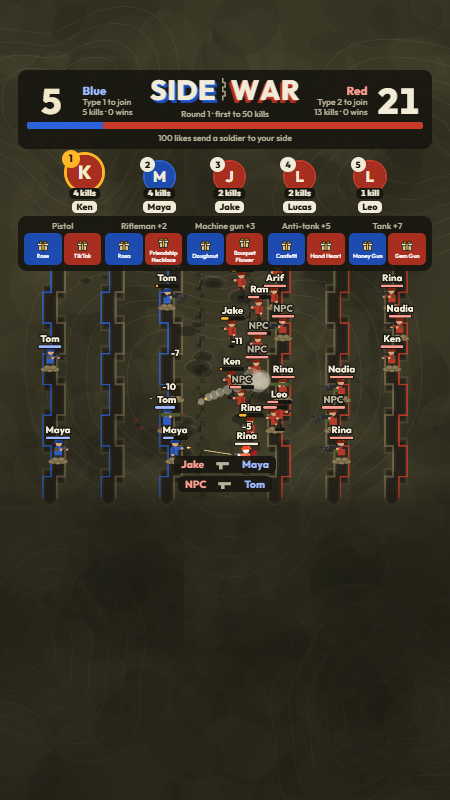
Two sides dig in on a battlefield seen from above, each with three trenches. Viewers pick a side by typing 1 or 2 in chat and get a free pistol soldier with their name on it. Likes send more soldiers, and gifts send whole squads: riflemen, machine gunners, anti-tank soldiers and tanks. The soldiers fight from the trenches, move up to attack, shoot, dodge and fall on their own. The first side to reach the kill target wins the round, and the top killers are shown at the top of the screen.
The game runs on your own computer. A small Python server connects to your LIVE and runs the battle, and the game screen is a web page you add to OBS or TikTok LIVE Studio as a Browser Source. No coding is needed.
What's included
- Five soldier types, each with its own weapon, health, range and sound: pistol soldier, rifleman, machine gunner, anti-tank soldier and tank.
- Three trenches per side with cover and dodging, soldiers who push into the enemy's half only when it is safe, and tanks that hold their ground.
- Chat joining, soldiers from likes, and gifts that send mixed squads by coin value. Ten gifts come set up, five for each side.
- A kill leaderboard of avatar circles at the top, kept when the server restarts, and a top soldier for every round.
- NPC soldiers to keep a quiet stream lively. They never reach the leaderboard and step aside for viewers.
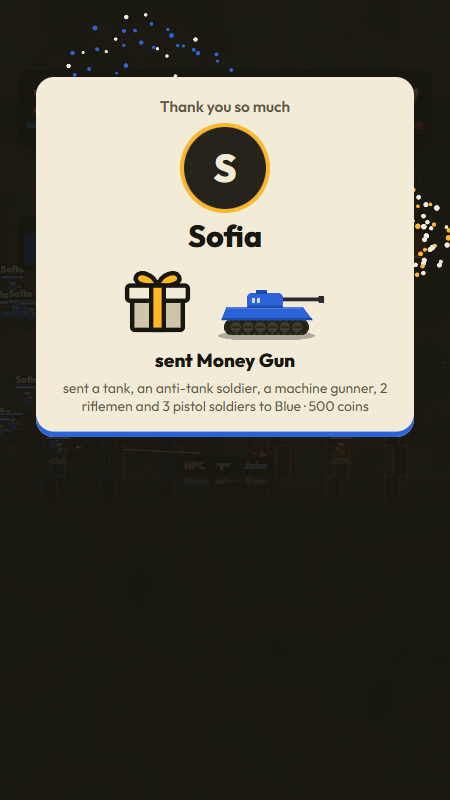
- Three sizes of gift thank-you: a notification, a banner with fireworks and a full-screen spotlight.
- An Admin Panel to run the battle, follow everything that happens and test without going live. It works on a phone too.
- Fifteen original sound effects you can replace with your own.
2. Quick start
- Install Python 3.10 or newer (tick "Add Python to PATH" on Windows).
- Open the
Sourcefolder and double-clickSTART_GAME.bat. - Copy the password shown in the server window.
- In OBS, add a Browser Source with the URL
http://localhost:5000, 1080 × 1920. - Open
http://localhost:5000/admin, log in, and try the game with Test without going live. - Go live, then type your username in the TikTok tab and click Connect.
3. Requirements
- Windows 11 (tested). A start script for macOS and Linux is included.
- Python 3.10 or newer.
- OBS Studio, TikTok LIVE Studio, Streamlabs Desktop or another app with a Browser Source.
- An internet connection and a TikTok account that can go LIVE. The game never asks for your TikTok password.
4. Installation
Windows
- Extract the zip file.
- Open the
Sourcefolder and double-clickSTART_GAME.bat. - The first start installs the Python packages it needs (about a minute), then starts the server.
macOS, Linux, or by hand
- Open a terminal in the
Sourcefolder. - Install the packages:
pip install -r requirements.txt - Start the server:
python app.py(orbash start_game.shon macOS and Linux).
The server window

- Game screen and Admin panel: the two addresses you need.
- From a phone: open the Admin Panel from a phone on the same Wi-Fi.
- Password: the Admin Panel password for this run.
- Below the summary, every round, gift, NPC change and TikTok connection change is listed with the time.
5. Admin password
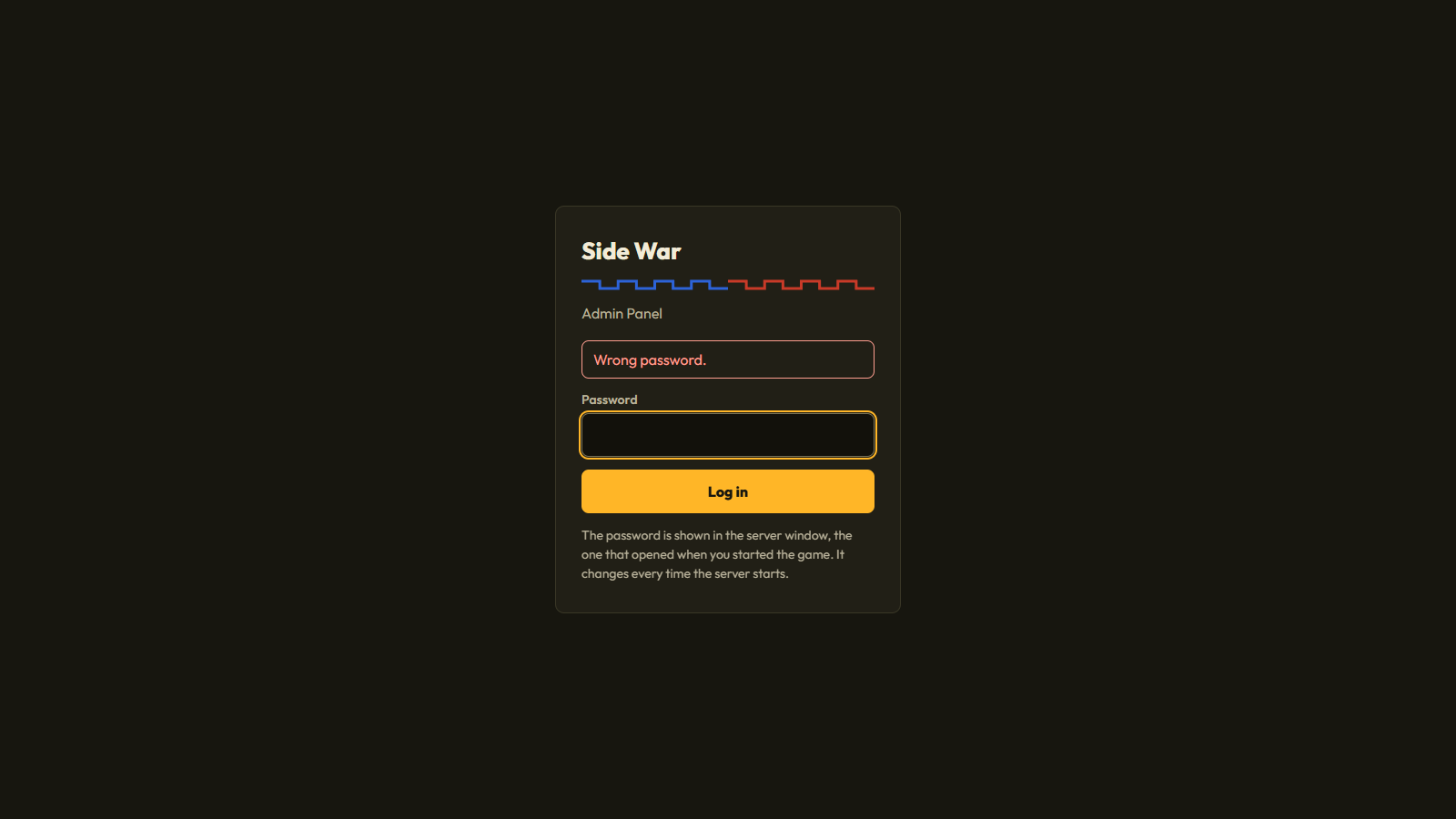
There is no default password. Every time the server starts, it creates a new random password and shows it in the server window, next to Password. Capital letters and the dash are optional: k7qxm2tp works for K7QX-M2TP.
Forgot it or closed the window? Restart the server and use the new one.
SW_ADMIN_PASSWORD environment variable before starting the server. On Windows: set SW_ADMIN_PASSWORD=YourPassword and then python app.py in the same window.6. OBS setup
- In OBS or TikTok LIVE Studio, open the scene you stream with.
- Add a Browser source.
- Set the URL to
http://localhost:5000/, the width to1080and the height to1920. - In OBS, tick Control audio via OBS to mix the game sounds.
The game screen is always 9:16. In a normal browser window it stays 9:16 with bars at the sides. For a horizontal stream, keep the source at 1080 × 1920 and scale it down in OBS.
Everything that matters sits between the top 9% and about 62% of the height. The top is left for TikTok's header, and the bottom 38% stays calm and dark because TikTok's chat and gift bar cover it on viewers' phones.
7. Connecting to TikTok
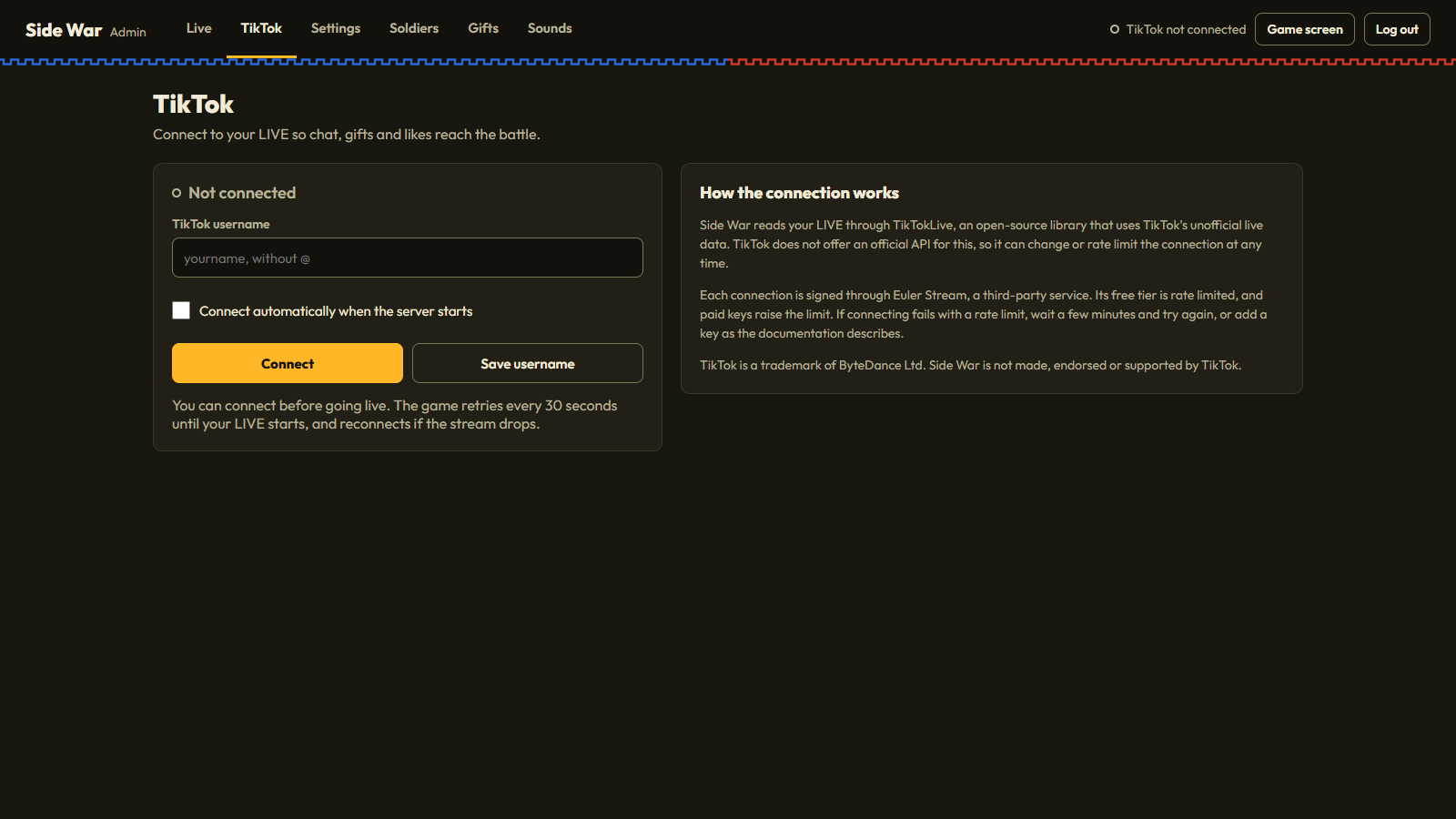
- In the Admin Panel, open the TikTok tab.
- Type your username without the
@. - Tick the auto-connect box to connect on its own every time the server starts, and save.
- Click Connect.
You can connect before you go live: the status says your LIVE hasn't started and the game retries every 30 seconds. If the stream drops, it reconnects by itself.
About the connection
The game reads your LIVE through TikTokLive, an open-source library that uses TikTok's unofficial live data. TikTok can change or rate-limit that data at any time, which can stop the connection until the library is updated.
TikTokLive signs each connection through a third-party service, Euler Stream. Its free plan has a daily request limit; if connections start failing with a rate-limit message, wait a few minutes, or add a key from Euler Stream.
Possible ongoing cost. The game runs on Euler Stream's free plan without a key. If you stream often or keep hitting the limit, you may need a paid plan: a monthly subscription billed by Euler Stream at their own prices, which can change. It is not included in the price of this item. You are responsible for any costs and account requirements needed to go live and stay connected.
TikTok is a trademark of ByteDance Ltd. This item is not made, endorsed or supported by TikTok.
Using a signing key
Set the key in the SIGN_API_KEY environment variable before you start the server:
To keep using START_GAME.bat, add the line set SIGN_API_KEY=your-key-here to it, right under cd /d "%~dp0".
Every environment variable the game reads is listed in Environment variables.
If the signing service changes
Euler Stream can change what it needs from you, for example a key for every connection, a new plan, or a new address. The game itself does not need to change for that. Here is what to do:
- Spot it. Connections fail with
SignatureRateLimitError,PremiumEndpointErrororSignAPIError(see Connection status and debugging), or the server window shows a notice from the signing service, such as a key that is now required or has expired. - Check the new requirements on Euler Stream's website and in your Euler Stream account.
- Get a new key from your Euler Stream account if one is needed. Treat it like a password.
- Replace the old key. Change the value in the line
set SIGN_API_KEY=...inSTART_GAME.bat(or wherever you set it, see Environment variables), save the file and restart the server. The new key is used from the next connection. - If the service moves to a new address, set
SIGN_API_URLto it the same way. - Test it. Click Connect in the TikTok tab. "Connected to @username" means it works.
- If it still fails, TikTokLive itself may need an update for the new rules. Check this item's page on CodeCanyon for an update first: each update of this item is tested with the TikTokLive version in
requirements.txt. Installing a newer TikTokLive yourself withpip install --upgrade TikTokLivecan break the game;pip install -r requirements.txtputs the tested version back.
*** in the lines you copy from the server window.8. Connection status and debugging
The game shows the state of its TikTok connection in three places, so you can see at a glance whether chat, likes and gifts are coming in, and why when they are not.
Where to see it
- Top right of every Admin Panel tab: a short status with a colored dot: Live: @username, TikTok connecting, Waiting for your LIVE, TikTok error or TikTok not connected.
- TikTok tab: the full status message, with the reason when a connection fails. Every change is also added to the Activity list on the Live tab.
- Server window: every connection attempt, connection, retry and error with the time, in lines tagged
TikTok. Warnings are yellow and errors red, with the full message from TikTok, TikTokLive or the signing service.
What each status means
| Message in the TikTok tab | What it means | What to do |
|---|---|---|
| Connected to @username | The game receives chat, likes and gifts from your LIVE. | Nothing. |
| Connecting to @username... | A connection attempt is running. | Wait a few seconds. |
| @username is not live yet. Retrying every 30s... | The account exists, but no LIVE is running. | Start your LIVE. The game connects on its next try. |
| The LIVE has ended. Waiting for the next one... | TikTok reported the end of your LIVE. | Nothing. The game keeps trying every 30 seconds and connects when you go live again. |
| Connection closed. Reconnecting in 30s... | The connection dropped, for example after a network hiccup. | Nothing. It reconnects by itself. |
| TikTok user @username was not found. Check the username. | No TikTok account has this username. The game stops trying. | Type the username without the @, exactly as on your profile, and click Connect. |
| Connection failed (error name). Retrying in 30s... | The attempt failed. The name in brackets says why. | See the table below. The game keeps retrying every 30 seconds. |
| TikTokLive is not installed. Run: pip install -r requirements.txt | The Python packages are missing. | Run that command in the Source folder and start the server again. |
| Not connected, or Disconnected | No connection was started, or you clicked Disconnect. | Click Connect. |
Error names
| Error name | Usual cause | What to do |
|---|---|---|
SignatureRateLimitError | The free Euler Stream plan's limit was reached. | Wait; the game retries on its own. If it happens often, add an Euler Stream key with SIGN_API_KEY. Paid plans are a monthly cost. |
PremiumEndpointError | The signing request needs a paid Euler Stream key. | Add a key from a plan that includes it. |
SignAPIError, UnexpectedSignatureError, SignatureMissingTokensError | The signing service is down, or answered something TikTokLive did not expect. | Wait a few minutes. If it goes on for hours, TikTok or the signing service has probably changed; check the item page for an update. |
AgeRestrictedError | TikTok marks the LIVE as age-restricted, and its data is not available without signing in. | Remove the age restriction from your LIVE. |
WebcastBlocked200Error | TikTok refused the request from this network. | Wait and try again later, or try another internet connection. |
ConnectError, ConnectTimeout, ReadTimeout, OSError, TimeoutError | No internet, or a firewall or VPN blocks the connection. | Check the internet connection and allow Python through the firewall. |
ConnectionClosedError and other WebSocket errors | The live connection was cut. | Nothing. It reconnects by itself. |
When nothing comes in
- Check that your LIVE is running on the same account you typed in the TikTok tab.
- Read the status in the TikTok tab and the
TikToklines in the server window. Yellow and red lines say what went wrong. - Send a test comment, like or gift with the Admin Panel's test tools. If the game reacts, the game and OBS are fine and only the TikTok connection needs attention.
- Click Disconnect and then Connect to start a fresh attempt.
- If the status does not change for a few minutes, restart the server.
- When you ask for support, copy the
TikToklines from the server window into your message. They contain the full error.
9. Environment variables
None are required: the game runs with no environment variables set. These optional ones change how it starts.
| Variable | Required | Default | What it does |
|---|---|---|---|
SIGN_API_KEY | No | Not set: the free Euler Stream plan | Your Euler Stream API key. TikTokLive signs connections with it, with your plan's higher limits. Paid plans are a monthly cost billed by Euler Stream. |
SIGN_API_URL | No | Not set: Euler Stream's server | The address of another signing server that works with TikTokLive. For advanced users only. |
SW_ADMIN_PASSWORD | No | Not set: a new random password every start | Uses this Admin Panel password on every start instead of a random one. Leave it unset unless you need a fixed password, and never share it. |
NO_COLOR | No | Not set: colored output | Any value, for example 1, turns off the colors in the server window, which helps when you save its output to a file. |
SW_GIFT_IMAGES | No | Not set: gift pictures are loaded from TikTok at start | 0 stops the server from loading TikTok's gift list, so the game and the Admin Panel show the placeholder gift box until gifts arrive in your LIVE. |
How to set one
A variable set this way lasts until the window is closed. To set it every time, add set NAME=value on its own line in START_GAME.bat, right under cd /d "%~dp0", or export NAME=value in start_game.sh, under its cd line.
10. How to play
Joining a side
A viewer types a side's chat word on its own or in a short comment of up to four words:
| Side | Chat words (change them in Settings) |
|---|---|
| Blue (left) | 1, blue, biru, left, kiri |
| Red (right) | 2, red, merah, right, kanan |
Joining sends one free pistol soldier with the viewer's name. Each viewer has one free soldier at a time; when it falls, typing the word again brings a new one after 10 seconds. A viewer can switch sides by typing the other word.
Likes
Every 100 likes from a side's viewers send that side one more pistol soldier, named after the viewer whose like completed the 100. Likes from someone who hasn't picked a side go to the side with fewer soldiers.
Gifts
Every gift sends a squad. Ten gifts come set up with a fixed side, so viewers can send soldiers to either side:
| Squad | Blue gift | Red gift | Coins | Soldiers |
|---|---|---|---|---|
| Pistol | Rose | TikTok | 1 | 1 pistol soldier |
| Rifleman +2 | Rosa | Friendship Necklace | 10 | 1 rifleman, 2 pistol soldiers |
| Machine gun +3 | Doughnut | Bouquet Flower | 30 | 1 machine gunner, 1 rifleman, 2 pistol soldiers |
| Anti-tank +5 | Confetti | Hand Heart | 100 | 1 anti-tank soldier, 1 machine gunner, 1 rifleman, 3 pistol soldiers |
| Tank +7 | Money Gun | Gem Gun | 500 | 1 tank, 1 anti-tank soldier, 1 machine gunner, 2 riflemen, 3 pistol soldiers |
Any other gift sends a squad by its coin value to the side the viewer joined (or to the side with fewer soldiers):
| Coins per gift | Squad |
|---|---|
| 1 to 4 | 1 pistol soldier |
| 5 to 9 | 2 pistol soldiers |
| 10 to 29 | 1 rifleman, 2 pistol soldiers |
| 30 to 99 | 1 machine gunner, 1 rifleman, 2 pistol soldiers |
| 100 to 499 | 1 anti-tank soldier, 1 machine gunner, 1 rifleman, 3 pistol soldiers |
| 500 to 4,999 | 1 tank, 1 anti-tank soldier, 1 machine gunner, 2 riflemen, 3 pistol soldiers |
| 5,000 to 19,999 | 2 tanks, 2 anti-tank soldiers, 2 machine gunners, 3 riflemen, 5 pistol soldiers |
| 20,000 or more | 3 tanks, 3 anti-tank soldiers, 3 machine gunners, 4 riflemen, 6 pistol soldiers |
Combos multiply the squad: a Rose combo of 10 sends 10 pistol soldiers. Every gift and squad can be changed in the Gifts tab.
The soldiers
| Soldier | Health | Damage | Range | Shoots every | Role |
|---|---|---|---|---|---|
| Pistol soldier | 100 | 14 | 20 | 0.8 s | Takes the front trench. When no enemy has been in range for 4 seconds it moves up, but past the middle of the field only when that is safe. |
| Rifleman | 90 | 50 | 80 | 3.0 s | Sniper in the rear trench: long range, hits hard, fires slowly. |
| Machine gunner | 160 | 9 per bullet | 42 | 1.6 s | Front trench, fires bursts of 5 bullets. |
| Anti-tank soldier | 110 | 360 | 46 | 4.5 s | Middle trench. Rockets hit tanks for full damage and soldiers for 15%, with a small blast. |
| Tank | 1,600 | 120 | 60 | 3.8 s | Holds between its side's front and middle trench and shells the enemy lines. Pistols, rifles and machine guns do only 8% of their damage to it. Up to 3 per side at once; more tanks wait their turn. |
Range is measured in field units: 100 is the full width of the battlefield. All of these values can be changed in the Soldiers tab.
Trenches, cover and damage
- Each side has 3 trenches with 6 spots each, so up to 18 soldiers per side are in the trenches at once. Soldiers who leave their trench to attack free their spot; the rest wait their turn off the field.
- Soldiers fight from their trench first. When nothing has been in range for a few seconds (pistol soldier 4, anti-tank 5, machine gunner 6, rifleman 9), a soldier moves up, but only as far as the middle of the field. It goes into the enemy's half only when at most one enemy can fire at the spot it is heading for (a tank counts as two), and falls back into a trench as soon as that is no longer true. A soldier in the open that can hit an enemy from a free trench spot takes that spot.
- A soldier in a trench dodges 40% of the shots fired at it by other soldiers (not tanks) and takes 20% less damage from the ones that hit. Blasts do 40% less to soldiers in a trench.
- Damage is never a fixed number: a hit does 60% to 110% of the soldier's damage, and 1 hit in 5 only grazes for 30% to 50%. Each hit shows its damage above the target.
- Soldiers shoot while they run, with lower accuracy, and never advance past the enemy's front soldier.
Winning a round
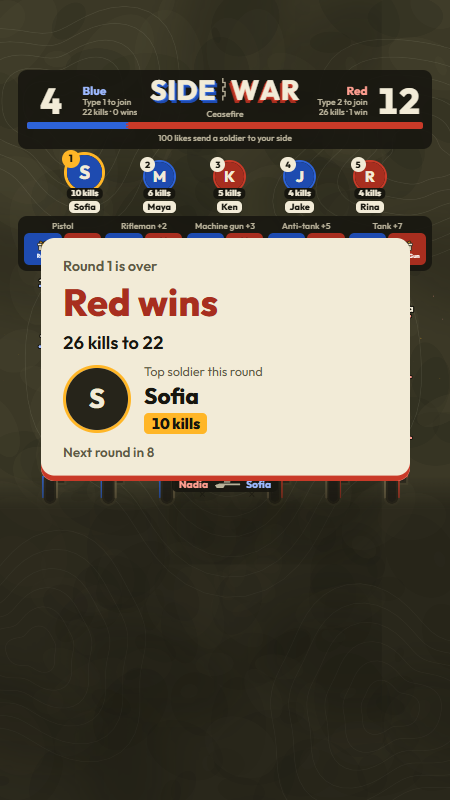
The first side to reach 50 kills wins the round. The result card shows the winner, the score and the top soldier of the round, and a new round starts 10 seconds later. Soldiers stay on the field between rounds, so a viewer's tank keeps fighting. Set the kill target to 0 for an endless battle without rounds.
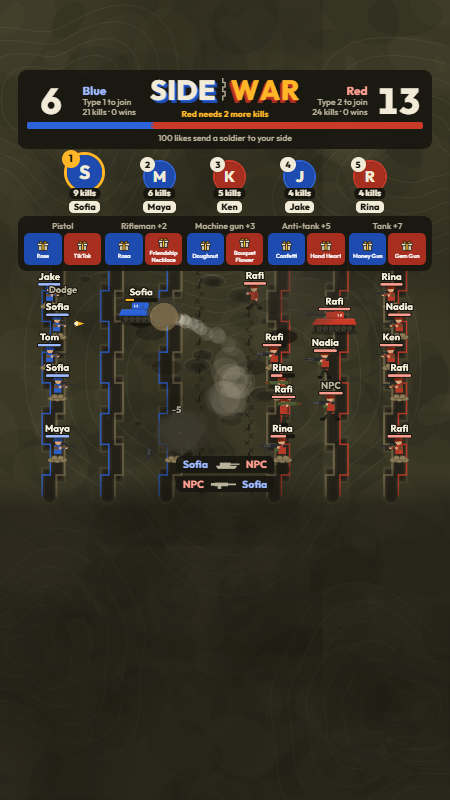
On screen
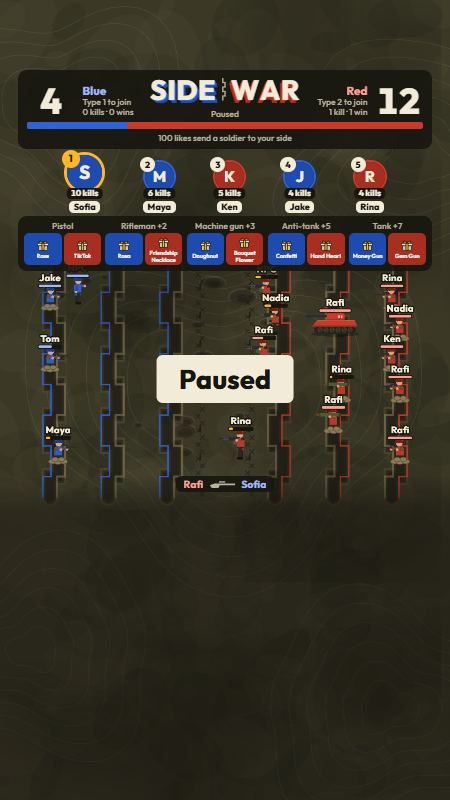
- Scoreboard: the big numbers are the soldiers each side still has on the field. Under each side's name: its chat word, kills this round and rounds won. In the middle, the game's name, the round and the kill target. The bar under it shows the strength of both sides, and the line below it the like rule.
- Top killers: the viewers with the most kills, kept between rounds and restarts. Empty places show "Open".
- Gift legend: which gift sends which squad, for each side, shown as each gift's picture (or the placeholder gift box with the gift's name, see Gift pictures).
- The battlefield: every soldier has a health bar and the name of the viewer who sent it. The last two kills show at the bottom edge.
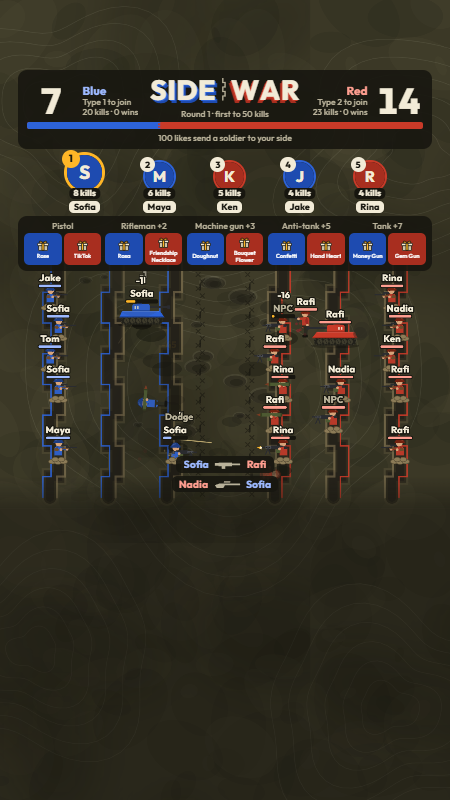
NPC soldiers
NPC soldiers are computer players that keep the battlefield busy when chat is quiet. Their kills count for their side but never for the leaderboard, and they step aside when a viewer's soldier needs their spot. The game keeps at least 4 soldiers per side on the field with NPCs (change it in Settings, 0 turns it off), and you can add more from the Admin Panel to a side of your choice or to random sides.
Pausing and quiet chat
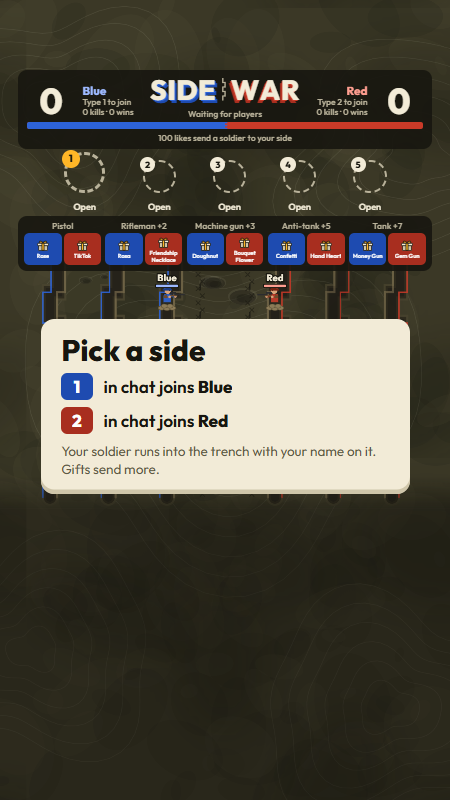
Press Pause in the Admin Panel to freeze the battle, for example while you talk to chat. After 5 minutes without any comment, like or gift, the battle waits for chat with a "Pick a side" card. The next comment, like or gift carries on with the same round and score.
11. Gifts and thank-yous
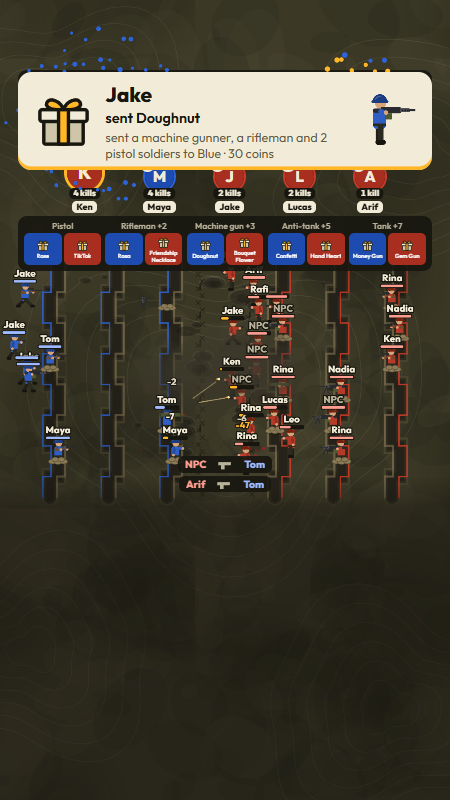
Every gift is thanked on screen, sized by its total coin value (a Rose combo of 10 counts as 10 coins):
| Gift value | Thank-you |
|---|---|
| Under 10 coins | A notification with the gift picture and the squad it sent. |
| 10 coins or more | A banner at the top with the sender's name, the gift spinning in, the soldier it sent and three fireworks. |
| 500 coins or more | A full-screen spotlight with the sender's photo, the gift, the soldier it sent, a firework show and its own sound. |
Change both limits in Settings. Banners and spotlights wait their turn, so each gifter gets a full moment even when several gifts arrive together.
Gift pictures
TikTok's gift artwork is not included in this item. When the server starts, it loads TikTok's public gift list once and uses the pictures from TikTok's own servers for the gift legend, the thank-yous and the Admin Panel (Gifts tab and test gifts); the server window then says Loaded ... gift pictures from TikTok. Wherever a picture is not available, the game shows its own placeholder: a plain gift box drawn for Side War, with the gift's name under it in the legend. That happens for a gift that is not in TikTok's list (gifts differ by region) until a viewer sends it during your LIVE, because TikTok sends the picture with every gift, and for every gift without an internet connection or with SW_GIFT_IMAGES set to 0. If one of the gifts in your Gifts tab is missing from TikTok's list, the server window warns Not in TikTok's gift list right now: ...; viewers in your region may not be able to send that gift, so pick another one. The screenshots in this guide were taken with SW_GIFT_IMAGES=0, so they show the placeholder.
12. Admin Panel
Open http://localhost:5000/admin. The tabs at the top are Live, TikTok, Settings, Soldiers, Gifts and Sounds. Changes apply to the running game straight away, without a restart.
Live
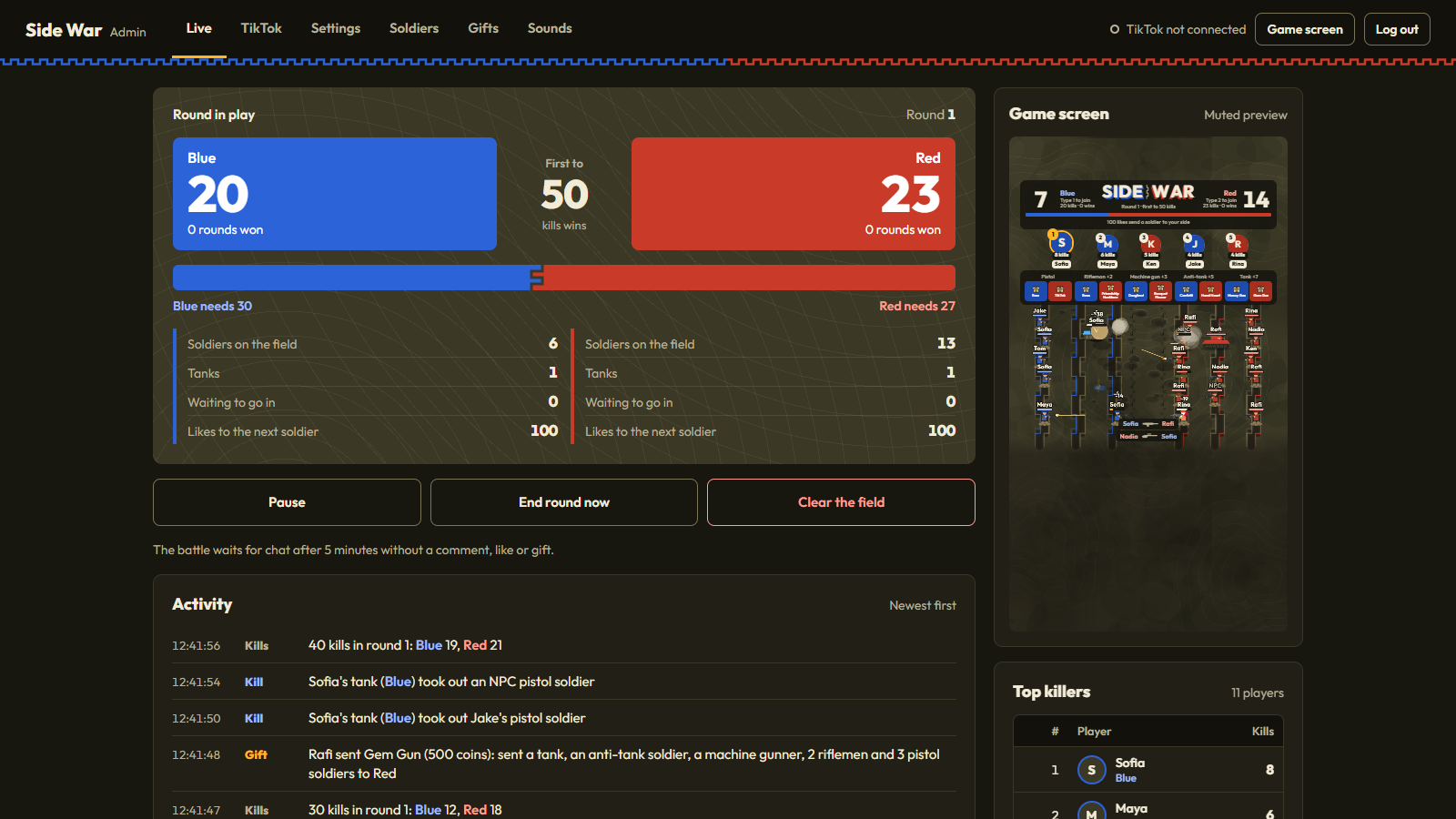
- Scoreboard panel: kills for each side, the kill target and what each side still needs, rounds won, soldiers and tanks on the field, soldiers waiting to go in and likes to the next soldier.
- Buttons: only the ones that apply are shown: start or resume, pause, end the round now, and clear the field.
- Activity: rounds, gifts, big kills, NPC changes and TikTok connection changes, newest first.
- Game screen: a muted preview of what viewers see.
- Top killers: the top 50 viewers by kills, with Reset leaderboard and Reset rounds won.
Test without going live
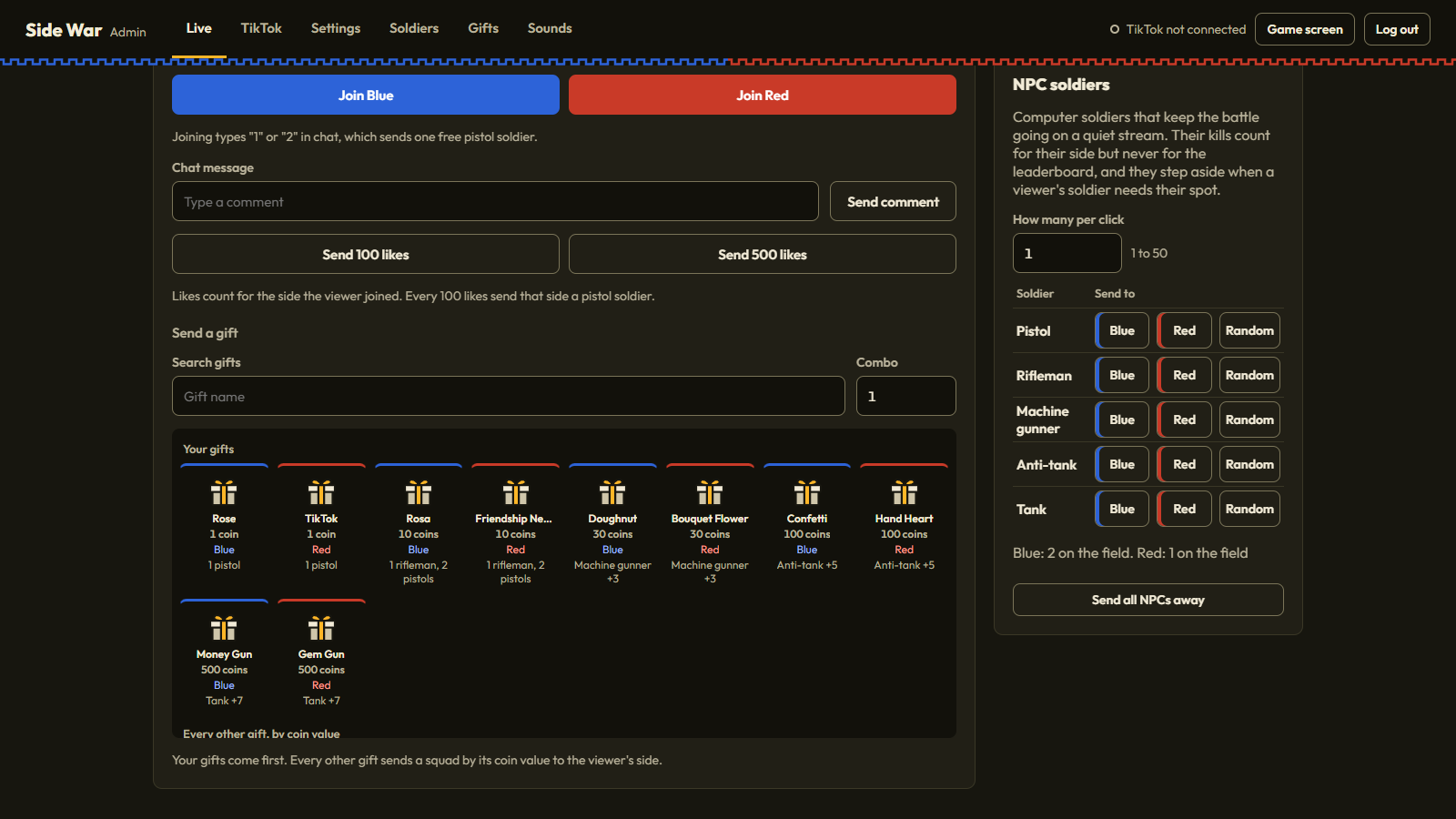
Join a side, chat, send likes and send any gift as a test viewer. Test viewers land on the leaderboard too, so reset it before your stream.
NPC soldiers

Pick how many per click, then send any soldier type to Blue, to Red, or to random sides. Send all NPCs away takes every NPC off the field.
Settings
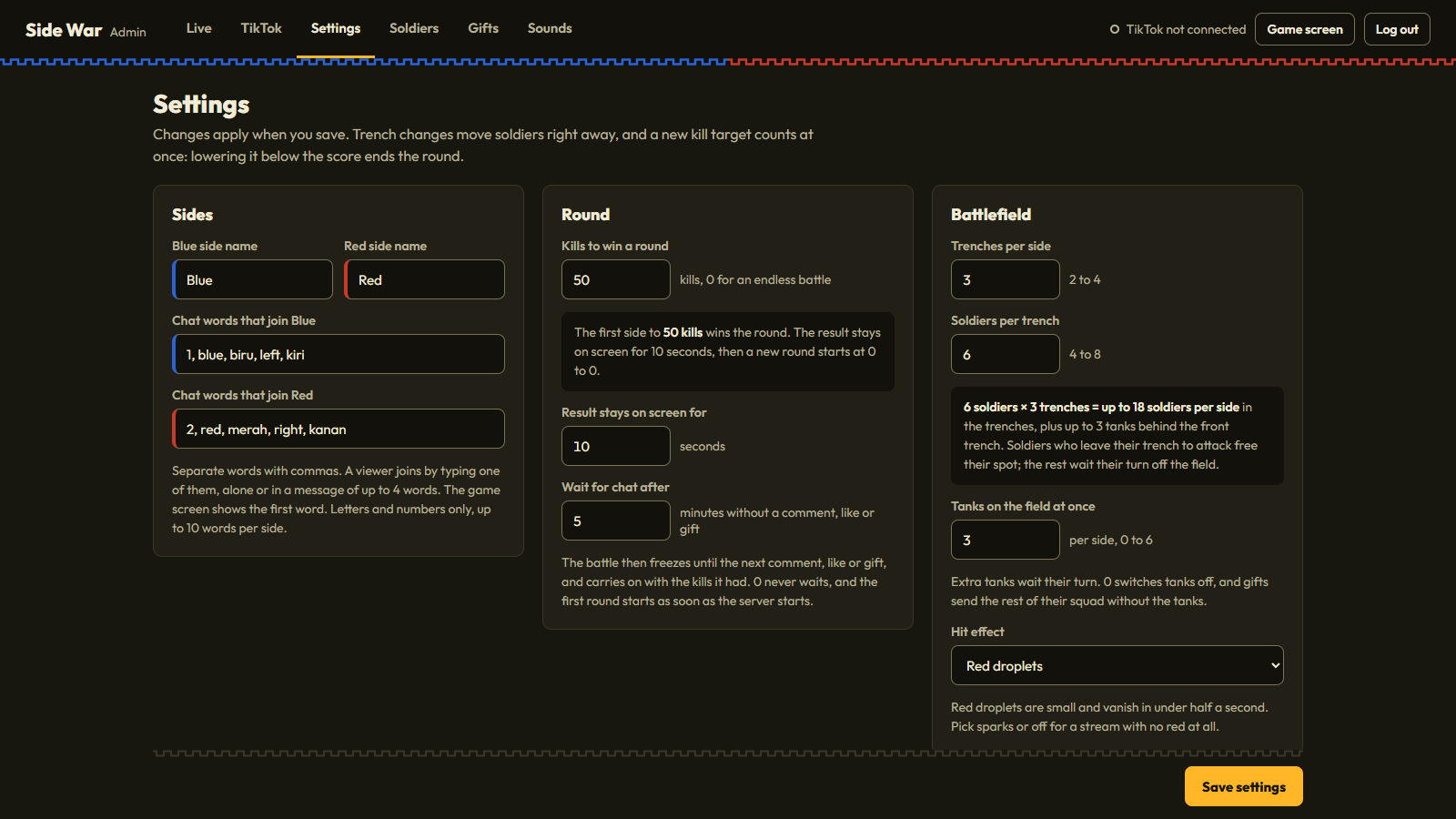
| Setting | Default | Range and what it does |
|---|---|---|
| Blue side name, Red side name | Blue, Red | Up to 16 characters each. |
| Chat words that join Blue / Red | See How to play | Up to 10 words per side, separated by commas. |
| Kills to win a round | 50 | 0 to 10,000. 0 makes an endless battle without rounds. |
| Result stays on screen for | 10 seconds | 3 to 60. |
| Wait for chat after | 5 minutes | 0 to 120 minutes without a comment, like or gift. 0 never waits. |
| Trenches per side | 3 | 2 to 4. |
| Soldiers per trench | 6 | 4 to 8. |
| Tanks on the field at once | 3 per side | 0 to 6. 0 turns tanks off; tank gifts still send the rest of their squad. |
| Hit effect | Red droplets | Red droplets, sparks only, or off. The droplets are small cartoon dots that vanish in under half a second. |
| Typing a side's word sends one free pistol soldier | On | Turn off to make chat only pick a side. |
| A fallen free soldier can return after | 10 seconds | 0 to 600. |
| One pistol soldier for every | 100 likes | 0 to 100,000. 0 turns likes off. |
| NPC soldiers: keep at least | 4 soldiers per side | 0 to 24. NPCs top up a side that has fewer soldiers. 0 turns it off. |
| Banner with fireworks from | 10 coins | See Gifts and thank-yous. |
| Full-screen spotlight from | 500 coins | See Gifts and thank-yous. |
| Title on the game screen | Side War | Up to 40 characters. Shown as the wordmark in the middle of the scoreboard. |
| Top killers on the game screen | 5 | 3 to 6. |
| Effects quality | Normal | Light draws the battlefield at half resolution and 30 frames per second with fewer particles, for slower streaming PCs. |
Soldiers
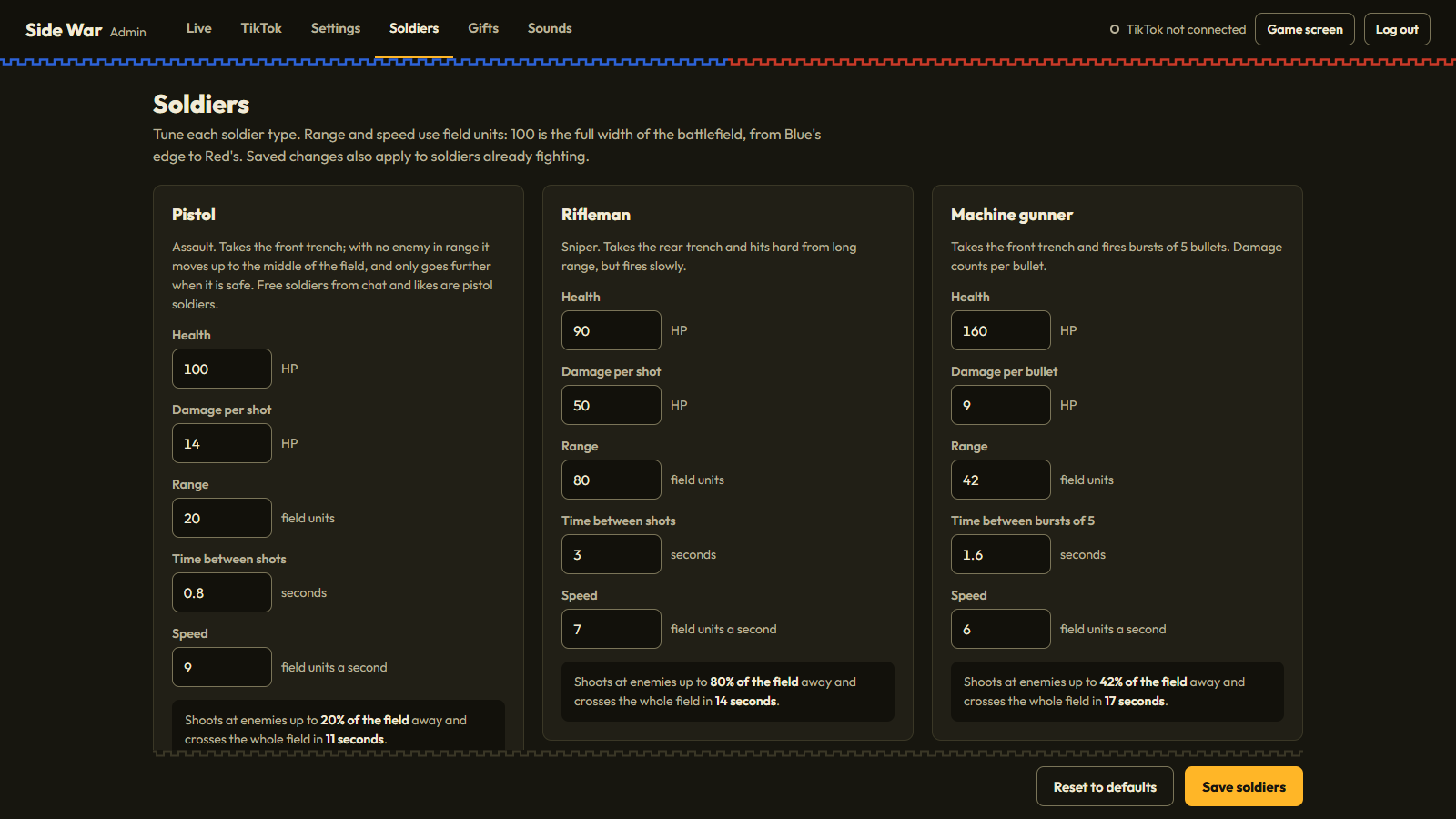
Change health, damage, range, seconds between shots and speed for each soldier type, or go back to the defaults. The table in How to play lists the defaults.
Gifts
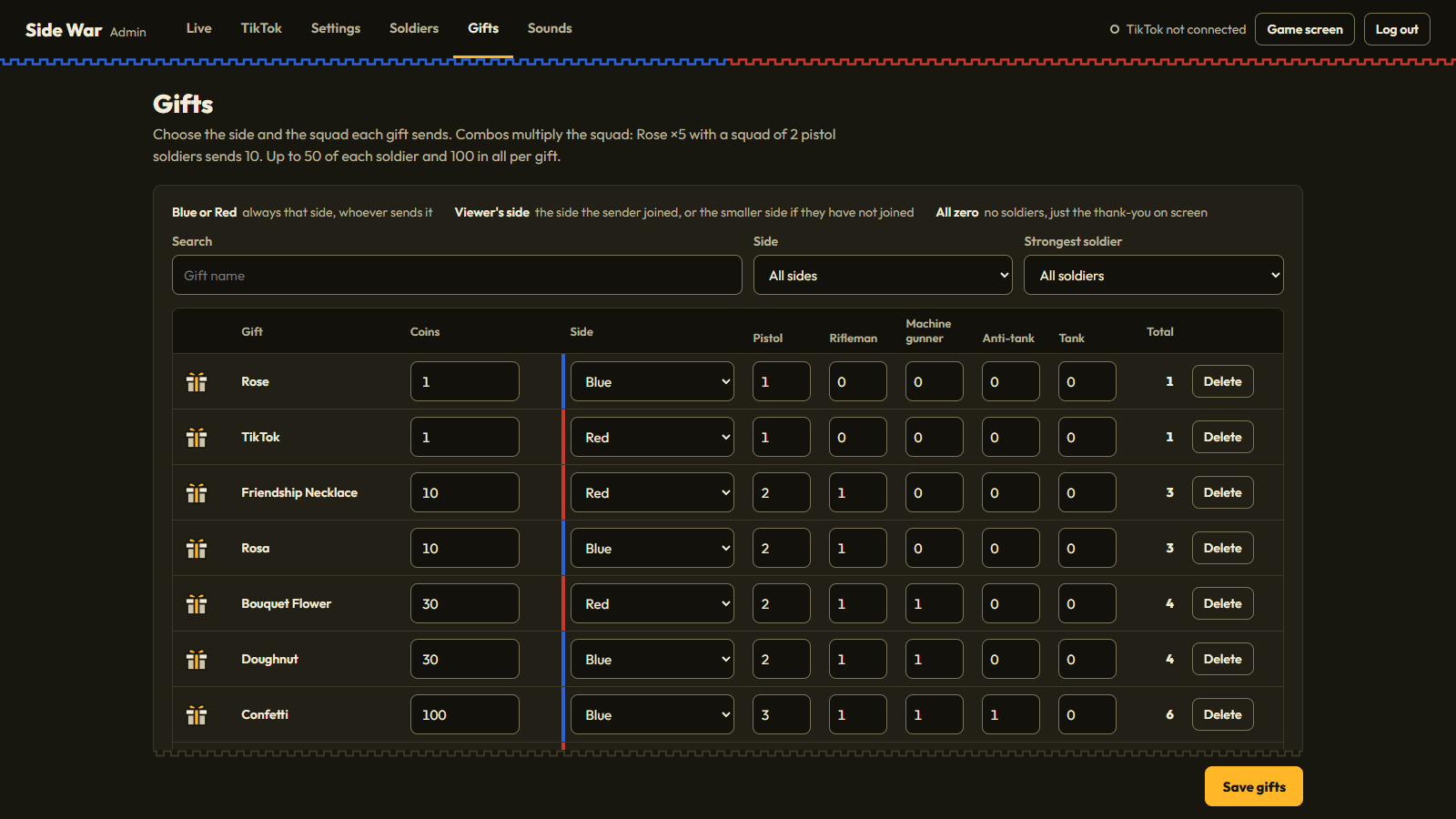
Each gift has a coin value, a side (Blue, Red, or the side the viewer joined) and a squad: how many pistol soldiers, riflemen, machine gunners, anti-tank soldiers and tanks it sends, up to 50 of each and 100 in all. A squad of all zeros only shows the thank-you. Filter the list by side or by the strongest soldier a gift sends.
Add a gift picks any gift from the list of TikTok gifts and fills in its coins and the squad for that coin value, or takes a name typed exactly as TikTok shows it. Gifts not in the list shows the squad that every other gift sends by its coin value (the table in How to play).
Sounds
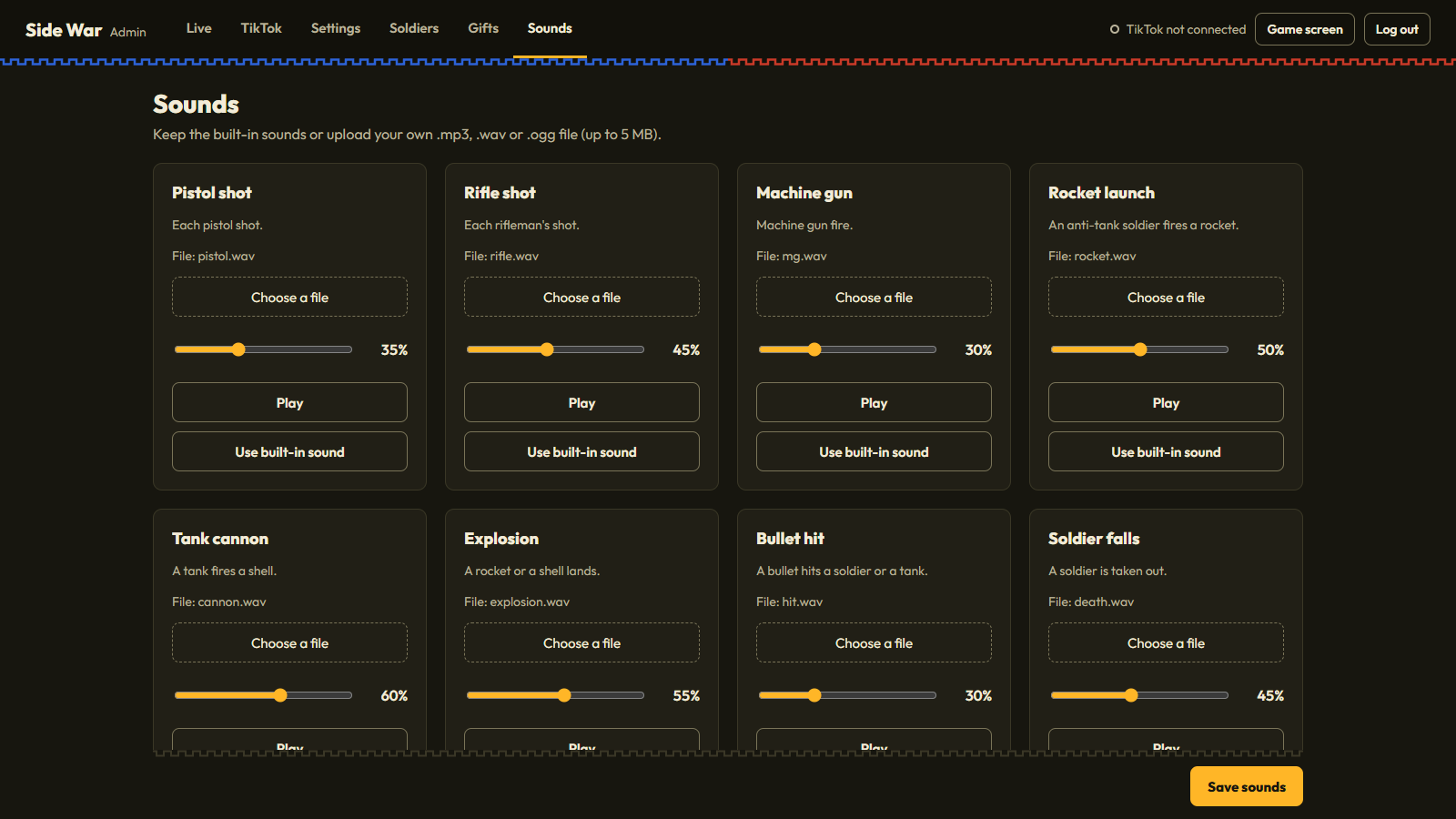
Fifteen sounds: pistol shot, rifle shot, machine gun, rocket launch, tank cannon, explosion, bullet hit, soldier falls, footsteps, tank engine, round start, round end, last kills tick, gift and big gift. Upload your own .mp3, .wav or .ogg (up to 5 MB), set the volume and play it, then save.
From your phone
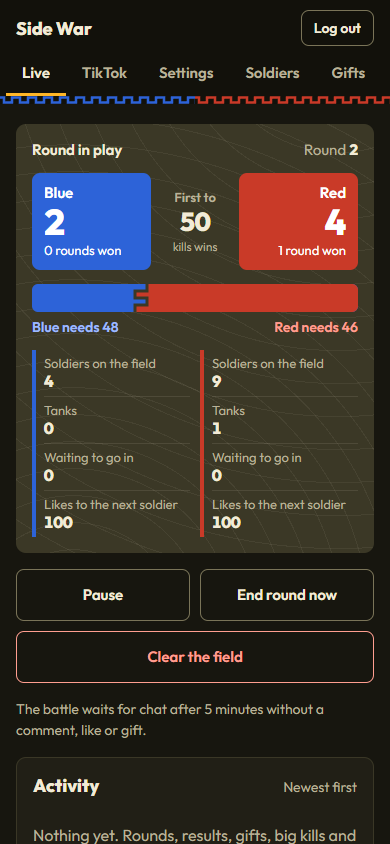
On the same Wi-Fi as your streaming PC, open the From a phone address shown in the server window and log in. If Windows asks whether Python may use the network, allow private networks.
13. How it works
tiktok_connector.py joins your LIVE as a viewer through TikTokLive and receives comments, gifts and likes. game_engine.py runs the whole battle on the server ten times a second: soldiers, trenches, aiming, damage, kills and rounds. It sends every open game screen and Admin Panel the positions and events of the battle, and the current score whenever it changes. The game screen only draws what it receives, so a refresh, a background tab or a second preview window can never fall out of step.
What is saved where
Source/game_state.json: the kill leaderboard, rounds won and the round number. Created on the first start.Source/tiktok_config.json: your settings, soldiers, gifts, sounds and TikTok username.Source/static/audio/: the sounds, including the ones you upload.
Every admin action needs a login, and saving settings also needs a CSRF token.
14. Customization and branding
Title, side names and chat words
In Settings, no code needed. The title also becomes the browser tab title.
Colors
The game screen colors are at the top of Source/static/css/game.css, and the Admin Panel's at the top of Source/static/css/admin.css:
The soldiers and trenches are drawn in Source/static/js/game.js; their side colors are in the PAL list near the top. The placeholder gift box shown when a gift picture is not available is Source/static/images/gift-box.svg; replace it with your own SVG of the same name.
Font
The game uses Outfit from Source/static/fonts/. To change it, replace the .woff2 files and update outfit.css.
Logo
The game's name is shown as text in the wordmark. To use a logo instead, replace the <h1 class="wordmark"> in Source/templates/game.html with an <img> of your logo.
Sounds
Upload your own in the Sounds tab.
Port
The server uses port 5000. To run it next to another app on that port, set "server": { "port": 5001 } in Source/tiktok_config.json, restart, and use the new port in OBS.
15. File structure
16. Updating and uninstalling
Updating to a new version
- Stop the server.
- Keep copies of
tiktok_config.jsonandgame_state.jsonfrom yourSourcefolder. - Replace the
Sourcefolder with the new one, then put the two files back. - Run
START_GAME.bat; it installs any new packages.
Uninstalling
Delete the game folder. To also remove the Python packages it installed, run pip uninstall flask flask-socketio TikTokLive.
17. Troubleshooting
The game screen is blank in OBS
Check that the server window is still open, and start it again if not. Then open the Browser Source properties and click "Refresh cache of current page". If the screen says it can't reach the game server, the server isn't running or the port is different.
I can't log in
Use the password from the current server window; it changes on every start. If you see "Too many failed attempts", wait 5 minutes or restart the server.
TikTok won't connect
Check the username (no @) and that you are live. A message that your LIVE hasn't started is normal before the stream starts. A rate-limit message comes from the signing service: wait a few minutes or use a key (see About the connection).
A viewer typed 1 but got no soldier
Each viewer has one free soldier at a time, and a fallen one returns 10 seconds later. Long sentences (more than four words) are ignored so normal chat doesn't join by accident. When the trenches are full, new soldiers wait their turn off the field.
The battlefield is crowded with NPCs
Lower "Keep at least" in Settings, or set it to 0, and click Send all NPCs away.
The game is slow on my PC
Set Effects quality to Light in Settings. The game logic is the same; only the drawing gets lighter.
No sound
OBS plays sounds by itself. In a normal browser tab, click the page once (a "Click to turn on sound" button appears). Also check the volumes in Sounds and the Browser Source level in the OBS mixer.
"Address already in use"
Another program, or a second copy of the game, is using port 5000. Close it or change the port.
18. FAQ
Can I try it without going live?
Yes. Use Test without going live and NPC soldiers in the Live tab.
Is there blood?
Only small cartoon droplets that vanish in under half a second, and no bodies are left behind. Switch it to sparks only or off in Settings.
Do NPC kills count?
They count for their side's score, so a quiet stream still has a battle, but NPCs never appear on the leaderboard or as the top soldier.
What happens to soldiers when a round ends?
They stay on the field for the next round, so a gift is never wasted by bad timing. Only the kill count starts again.
Can I show the game on a second screen?
Yes. Any browser on the same network can open http://<your PC's address>:5000; every screen shows the same battle.
What happens if my internet drops?
The battle keeps running on your PC, and the TikTok connection comes back by itself when the internet returns.
Does the game need my TikTok password?
No. It only reads public LIVE events (comments, gifts and likes) using your username.
19. Credits and licenses
| Item | License | Notes |
|---|---|---|
| Flask 3.0.3 | BSD-3-Clause | Installed from PyPI by requirements.txt |
| Flask-SocketIO 5.3.6 | MIT | Installed from PyPI by requirements.txt |
| TikTokLive 6.6.5 | MIT | Installed from PyPI by requirements.txt |
| Socket.IO client 4.7.2 | MIT | Source/static/js/ |
| SweetAlert2 11.26.25 | MIT | Source/static/js/ |
| Outfit font | SIL Open Font License 1.1 | Source/static/fonts/ |
| Atkinson Hyperlegible Next font | SIL Open Font License 1.1 | Documentation/fonts/ |
| Barlow Condensed font | SIL Open Font License 1.1 | Documentation/fonts/ |
| Soldiers, tanks, trenches and effects | Original work | Drawn in code for this item |
| Placeholder gift box | Original work | Source/static/images/gift-box.svg, drawn for this item |
| Sound effects | Original work | Synthesized for this item |
| Gift names and coin values | Facts | Source/static/data/gift_catalog.json |
TikTok is a trademark of ByteDance Ltd. This item is not made, endorsed or supported by TikTok. The same list is in CREDITS.txt.
20. Changelog
Version 1.0.0, October 26, 2026
First release.
21. Support
Questions or a problem not covered here? Use the Support tab on the item's CodeCanyon page and include what you did and what happened, a screenshot of the server window, and your operating system and Python version (python --version).